Showing posts with label development. Show all posts

Thursday, October 04, 2007

Subquery Problems in mySQL

I'm having trouble selecting data for a web-based application. There are three tables, Articles, Keywords and KeywordsInArticle. There is a many-to-many relationship between the articles and keywords, which is handled by the piggy-in-the-middle KeywordsInArticle table. So, if we have the following scenario:

Articles
articleID  articleName
1             First Article
2             Second Article
3             Third Article
4             Fourth Article

Keywords
keywdID  keyWord
1             apples
2             oranges
3             bananas
4             grapes

KeywordsInArticle
articleID  keywdID
1             1
1             3
2             1
2             2 etc

We know that "First Article" is all about apples and bananas while "Second Article" is about apples and oranges etc. And for article #1, I can pull out a list of the relevent keywords by using the following SQL statement:

SELECT keywordsinarticle.articleID, keywordsinarticle.keywdID, keywords.keyWord
FROM keywords, keywordsinarticle
WHERE ((keywordsinarticle.keywdID=keywords.keywdID) AND (keywordsinarticle.articleID=1))
This would give the following result:
articleID   keywdID   keyWord
1             1              apples
1             3              bananas
So far, straighthforward. However, in the Content Management side of the application, there needs to be a way of managing the keywords associated with each article, to update the KeywordsInArticle table. However, this has a compound key value made up from the articleID and the keywdID. It cannot contain duplicate rows, so when adding a keyword entry to the list, I want to be able to select all keywords not already associated with that article. In the example, I need to select only "oranges" and "grapes" from the keywords table, to give them as options to add.

I want to be able to invert my selection, so I tried a using the above as a subquery and negating the result:
SELECT *
FROM keywords
WHERE keywdID NOT IN (SELECT keywordsinarticle.articleID, keywordsinarticle.keywdID, keywords.keyWord
FROM keywords, keywordsinarticle
WHERE ((keywordsinarticle.keywdID=keywords.keywdID) AND (keywordsinarticle.articleID=1)))
Sadly, mySQL throws a wobbler at this, telling me:
Message = "Operand should contain 1 column(s)"
Looking up this error at the mySQL website directed me towards the Row Subqueries page, but I'm not convinced this fits my problem either. So now I'm rather stuck. If anyone has any ideas, I'd love to hear them!

Thursday, March 22, 2007

Disconnected

When I first started cutting my teeth on dynamic web site development, I was pleased that Dreamweaver has plenty of tools to help out. Because we used it at work for sites, I chose the ASP.NET/C# server model, and used Access as the database (perfectly adequate for the size and features of the sites I was building).

Now I'm beginning to get to grips with PHP/mySQL for development. That's going well too. And having used mySQL for a while, I can see the advantages over Access. But what I'd really like to do is upsize a few of my Access databases to mySQL and have them connect to my existing .NET applications, without having to re-write the damned things.

The data migration tools available to s smooth job, and the data is sitting there, ready to go. But now I've hit a brick wall. How to tell Dreamweaver I want to use a mySQL database instead of access! So I began looking for the correct connection string, this was some help. I also downloaded MySQL ODBC 3.51 and installed it.

Then I set the web.config file entry to this (bold being the connection string given in the link above):


Driver={MySQL ODBC 3.51 Driver};Server=localhost;Database=myDatabase;User=myUser;
Password=myPassword;Option=3;" />


I tried the TEST button and Dreamweaver connected successfully! But try running the site via the browser (or Dreamweaver Live Data View) and it falls over with an error:
System.ArgumentException: An OLE DB Provider was not specified in the ConnectionString. An example would be, 'Provider=SQLOLEDB;'.
at System.Data.OleDb.OleDbConnectionString.ValidateParse()

So tried a different connection method, using Connector/Net 1.0.9 with this syntax in the web.config file - but got very similar results. Then I found this following in an Adobe Tech Note (my emphasis):
Do I have to use ODBC?
No. For ASP sites you can also connect to a database using OLEDB. For ASP.NET sites you must use OLEDB or the native ASP.NET SQL Server connector.
So it looks like it has to be OLEDB, but how to put the correct provider in the connection string? Nothing I've tried seems to work! Any clues? Has anybody actually got this combination to work?
  • Dreamweaver 8
  • ASP.NET/C# server model
  • mySQL database

Wednesday, December 06, 2006

Cowboys (Me) And Indians (That'll be Apache)

I'm A PHP Newbie
For some weeks, I've been meaning to try my hand at some PHP development, having done most of my projects to date with .NET. I bought the excellent book Blog Design Solutions in September, and have been gradually reading my way through it in my spare time. It gives advice on installing and tweaking some of the most common blog engines such as Movable Type, ExpressionEngine, WordPress and TextPattern, but the last chapter leads you through building your own blogging solution.

I thought this was a good place to start for a PHP newbie, since there were copious examples and plenty of advice about setting up your test environment, a notorious minefield to tread safely on your own.

Setting Up The Test Environment
Unfortunately, this is where the pain and suffering began... I downloaded the lastest stable Apache release (as adivsed by the book), which was supposedly 2.2.3, as the Win MSI installer. It half loaded up, but would not run as a service on my WinXP Pro machine. The Apache icon appared in my SysTray, but the context menu was blank, and it did not appear in my list of services to start manually! After going round the loop several times, I gave up and went back for the 2.0.59 release instead - which worked first time!

Because I've already got IIS running as my default web server on localhost, I had to tell Apache to use a different port - 8080 is the conventional one for a second web server. Then you can use this in your URL to call on Apache to serve your pages:

http://localhost:8080/blog/index.php
I had already installed MySQL 5.0.22 a while back, along with useful tools such as the accompanying Administrator, Query Browser and Migration Toolkit, but had not really used any of it in anger since.Consequently, it took a few minutes to remember what I'd chosen as the root password for the MySQL Administratior package! Eventually, I set up my database (all very straightfoward with the Admin plugin, you don't have to go messing about with SQL statements to make a new table etc, it's all done from a neat little GUI). I'd also got PHP 5.2.0 installed by now.

Connecting To The Database
The next hurdle came when I tried actually running a PHP page with a database connection. I kept getting an error:
Call to undefined function mysql_connect()
After some reading around in my book Beginning PHP and MySQL 5 book (another one which has been propping up the coffee table of late but came into it's own for this), it turns out that PHP5 does not ship with native MySQL support embedded; you have to download some extra libraries and then go fiddling around with the php.ini file. I found this tutorial page really useful in explaining what was needed. And for all the knocking that Microsoft gets in various quarters, I don't ever remember this much effort being required to set up IIS to run with the .NET framework! Bah, humbug.

Once the environment was properly configured, the actual blog development wasn't too bad. I had a few "moments" of frustration trying to chase down some syntax typos which caused various things to blow up, but you get used to that with hand coding!

Telling The Time
Another tricky thing to get right is date and time formatting. My PHP book gave me info if you want to use PHP to display the current date:
<?php echo "".date("l, jS F, Y"); ?>
Gives you "Wednesday, 6th December 2006".

There are occasions when you want to format the date in the SQL statement, and trying to get your head round a seemingly-arbitrary set of case-sensitive parameters in the format string is difficult. Which is where Dan Winchester's guide to MySQL date_format was also very handy. You might use something like this:
SELECT post_id, title, post
DATE_FORMAT(postdate, '%W, %D %M %Y') AS dateposted, DATE_FORMAT(postdate, '%H:%i') AS timeposted
FROM posts WHERE post_id=$post_id LIMIT 1
dateposted would display "Wednesday, 6th December 2006" as before, and the timeposted variable shows "22:45". I split these in two so the parsed date string could be displayed separately from the time portion - if you made two posts in a day, it's nice not to repeat the day/date element every time. If you wanted to lump them together, just use this instead:
SELECT post_id, title, post
DATE_FORMAT(postdate, '%W, %D %M %Y' at %H:%i) AS dateposted
FROM posts WHERE post_id=$post_id LIMIT 1
This will give "Wednesday, 6th December 2006 at 22:25" as one string.

Future Developments?
So now, I have my own blogging engine running on my localhost using PHP and MySQL. I'm not about to share the new blog with the world, as it largely consists of a personal diary and various rants, but it's been a very worthwhile exercise in dipping my toes in the murky PHP waters.

I may decide to develop the code further, and perhaps use it to host this blog on my own server in due course, but for the moment, it's staying right here at blogger.

Wednesday, November 22, 2006

Playpen #7 - Flickr API

With my new-found ability to consume RSS (and by inference, any XML), my next challenge was to combine that with Playpen # 2 - Lightbox JS and the Flickr API and see what fun I could have.

Firstly, I logged into Flickr and found a suitable photo set of mine to play with, taking note of the setID. Browsing the API documentation, I found the API Explorer page very useful. It gives you some handy values straight away, such as your userID, plus recent photoIDs, setIDs and contactIDs.

If you put the SetID in the form on the Explorer page, and call the method (I used an unsigned call, since I was only interested in displaying pictures, not writing details or uploading), the XML file for your photo set is returned, along with the all-important URL you can use to call the method from your web page.

Whilst I didn't actually need to save this generated XML file, I did find it useful to see exactly what was what in terms of the schema - sometimes seeing an actual value tells you an awful lot more than just seeing the name of an element or attribute.

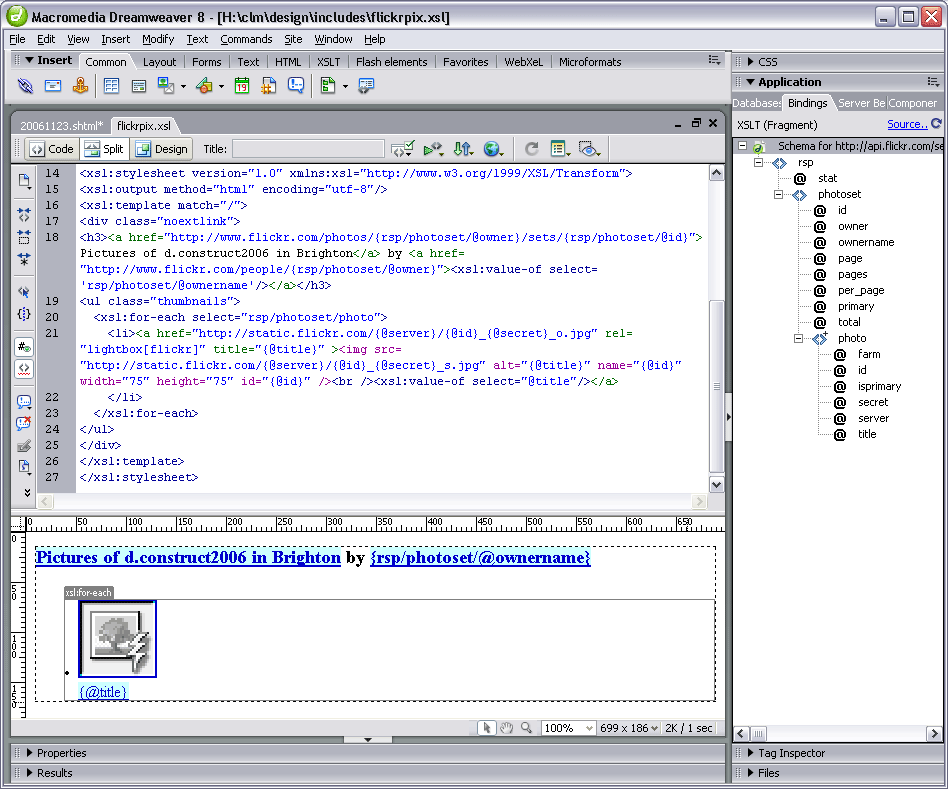
I then used Dreamweaver8 to generate a new XSL fragment file, which calls the aforementioned URL as its source. This gives you a display of the XML schema in the bindings panel. You can then drag and drop elements and attributes (relatively) painlessly onto your XSL document:

The nuts and bolts of my stylesheet are as follows:

<xsl:stylesheet version="1.0" xmlns:xsl="http://www.w3.org/1999/XSL/Transform">
<xsl:output method="html" encoding="utf-8"/>
<xsl:template match="/">
<h3>
<a href="http://www.flickr.com/photos/{rsp/photoset/@owner}/sets/
{rsp/photoset/@id}">Pictures of d.construct2006 in Brighton</a>
by <a href="http://www.flickr.com/people/{rsp/photoset/@owner}"><xsl:value-of select='rsp/photoset/@ownername'/></a>
</h3>
<ul class="thumbnails">
<xsl:for-each select="rsp/photoset/photo">
<li><a href="http://static.flickr.com/{@server}/{@id}_{@secret}_o.jpg" title="{@title}" >
<img src="http://static.flickr.com/{@server}/{@id}_{@secret}_s.jpg" alt="{@title}" name="{@id}" width="75" height="75" id="{@id}" />
<br /><xsl:value-of select="@title"/></a></li>
</xsl:for-each>
</ul>
</xsl:template>
</xsl:stylesheet>
The Photo Source URLs page was extremely useful in telling me what paths I needed to construct for the image thumbnails and originals. Even so, I spent a frustrating half hour getting the syntax right. I learned the hard way that copy/paste in the code view doesn't always get you the right path - but if you drag an attribute from the bindings panel onto the design view of the file (not the code view), the path is sorted out for you!

Basically, I was mistakenly adding:
{rsp/photoset/photo/@attribute}
instead of just {@attribute}, in the loop, and nothing showed up. But the overall title bit worked fine - because this was outside the loop, and did require the rest of the path to parse correctly. Argh!

With a bit of CSS styling, the photoset is displayed nicely in Playpen #7. Clicking the title or thumbnail then brings up the LightboxJS function to display the original image from Flickr, with it's title and prev/next links to the other pictures in the set.

RSS - Consumer Indegestion

As well as problems generating my own RSS feeds, I've been banging my head against the Adobe brick wall as far as consuming RSS is concerned.

Dreamweaver8 is my weapon of choice for development (so shoot me), and I tried a few months ago to get the BBC's Rugby Union RSS feed added to my rugbypix.com page. Adobe have a tutorial which explains a lot. Trouble was, I did everything they said, and on my localhost test environment, I kept getting an error message:

MM_XSLTransform error:
"http://newsrss.bbc.co.uk/rss/sportonline_uk_edition/rugby_union/rss.xml" is not a valid XML document.
The underlying connection was closed: Unable to connect to the remote server.
The claim that it wasn't a valid XML document was obviously rubbish, since the BBC's feed works in all the feed readers I've tried! Googling for the error didn't produce anything sensible, so I shelved the project and put it on the back burner for a while.

Returning to it this afternoon, I tried uploading the XSL fragment (which does the data repeat for the feed) and the page in which the transformation is called, onto my live server. I got a different message - the MM_XSLTransform.cs file was missing - progress! I knew that on my previous attempts, the only transform I could find available was the MM_XSLTransform.vb file, which was the wrong server model for my site.

Another quick google for the C# transform got me to this page. And, voilà! a link to download the missing MM_XSLTransform.cs. Bung it in the includes/MM_XSLTransform/ folder and upload it to the site, and Bob's your uncle... BBC Sport Rugby Union feed at rugbypix.com

Great, another niggling problem ticked off my list!

Friday, November 17, 2006

Playpen #5 - Well Fed

Generating RSS
I've been meaning to get some rss feeds sorted out for my photographic sites for some time. There were some technicalities which I was wracking my brains to overcome, and for a while, I couldn't make up my mind which format to support. But in the end, it only took a couple of dollars to pull my finger out - I found a great tutorial at CommunityMX about blog authoring, which gave me the final push.

I also found the rss2.0 specification and feed validator for Atom and RSS invaluable in getting a valid feed sorted out.

Where Are My Feeds?

Feed Reader Interpretations
One thing I'd not really taken much notice of, as a consumer of other people's feeds, was how various feed readers actually present the information. But once I started authoring feeds, it's become a bit more obvious how each aggregator parses the xml file to display the feed. Some will only show 20 posts (no matter how many are actually in the feed), others keep a cached copy and don't seem to want to update the feed if the order of posts hasn't changed but the layout and content has. All rather frustrating if you're trying to author a feed and test it!

Some Anomalies
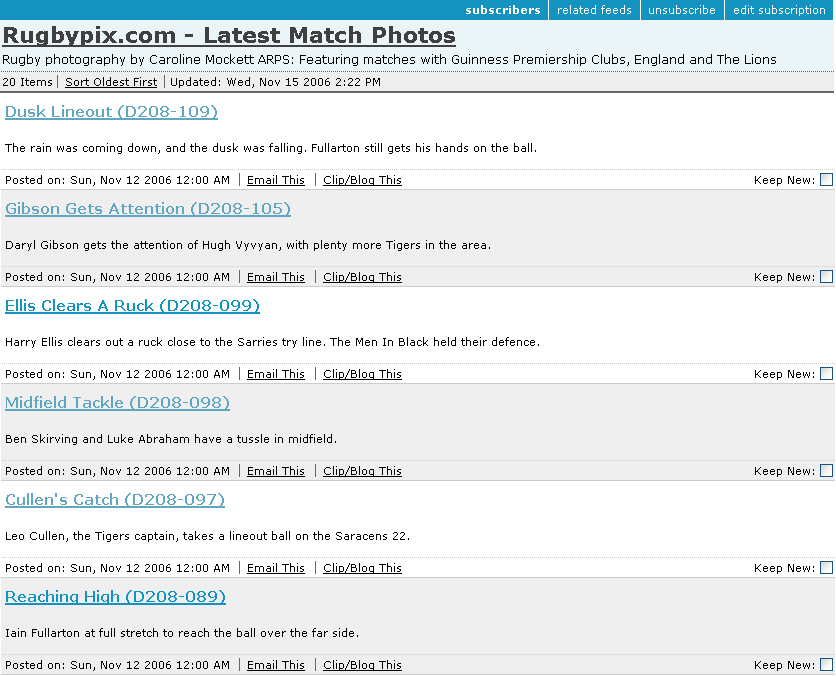
First off, Bloglines keeps a cache of the feed, and so it's only showing an early version of the rugbypix feed (without thumbnails) in this screenshot:

Also, if a feed has 40 items (I sometimes post a large batch of images so didn't want to limit the feed to the last dozen or so), it only shows 20 - the oldest 20. So when other feed readers show the last two matches (40 images = 2 games, 20 images each), Bloglines will only display the last but one game's pictures, not the latest 20. [Add: between composing this and actually posting it, Bloglines has now caught up and refreshed the feed - but it did take about 48 hours!]

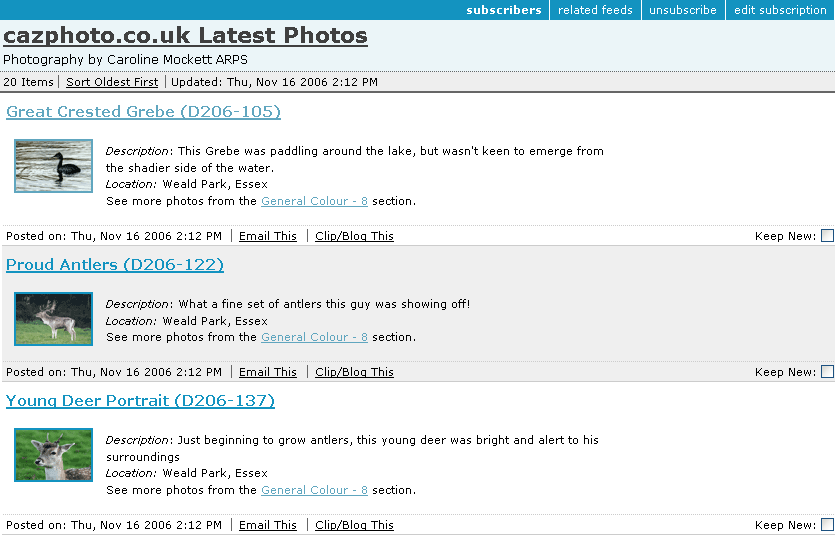
The cazphoto feed looks a little better (I'd got the hang of formatting by now):

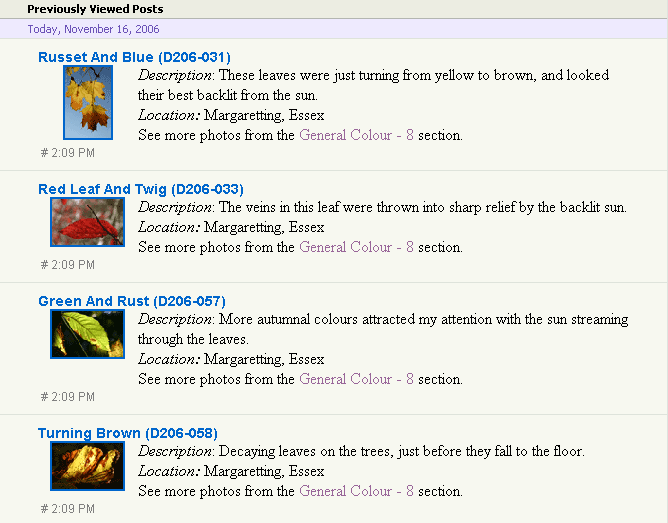
Next we see what it looks like in YahooMail Beta feed reader:

Quite a nice presentation, but it doesn't show the date up very well.

Google's feed reader makes a nice job of things in expanded view:

Plus it offers a cutdown list view if you so wish:

I also tried the Sage plugin for Firefox, which gives yet another take on the display, showing a 3-pane affair, feeds at top left, item summary of feed in bottom left and a rather more snazzily-laid out view of each item in the right pane:


So there we have it - a small sampling of feed readers. What's your favourite feed reader, and how well does it render your chosen feeds? One final (surprising) thing I found out during my investigations was that the standard Flickr Photo Feeds don't validate! Oops!

Publicising Your Feed
It's no good having a feed and no-one knows it's there. Adding a suitable link (often showing the Feed icon icon) to your website can help. Also, add a link in the head of your page to tell feed readers your feed is available. This takes the format:
<link rel="alternate" type="application/rss+xml" title="My Feed " href="http://www.mysite.com/rss/">
Third Party services such as pingomatic can also help raise the profile of your feed. Happy pinging.