Showing posts with label simon willison. Show all posts

Wednesday, December 05, 2007

Lifestream, Yahoo! Pipes and jQuery

Jeremy Keith's lifestream was the first I saw online, where he'd aggregated together his many RSS feeds into one place. It shows the various sources ordered by time, and it can be quite interesting to follow along and see what sort of sources are most prevalent at any one time. I'd been meaning to have a play with something similar myself for some time, but wasn't sure how to go about it. Then a couple of weekends ago, I went to BarCampLondon3 and Cristiano Betta did a great session on how to author your lifestream using Yahoo! Pipes. There's bags more information about how to do it at his blog. Finally, I thought it was about time I had a play with it myself. The feeds I used were the following:

I decided against using my Last.fm feed for the moment, as it would probably swamp all the other inputs (I listen to a lot of music while working, it's one of the perks of working from home, no-one moans about your choice of songs!).

Having got the basic lifestream out of Pipes, I used Dreamweaver's XSLT transform functionality to generate a list which would sit in my ASP.NET page. I wanted to use specific icons to show which feed each item was from. Cristiano was using a JSON output for his pipe, but mine is coming out as RSS, so the custom ID's applied in the pipe weren't getting through, since they're not part of the RSS spec.

CSS3 attribute selectors are one option, but they don't work in clunky browsers like IE6. So having also been at Simon Willison's jQuery session at BarCampLondon3, I thought I'd have a play with with the library to see if I could do some neat DOM manipulation to add the correct class to each list item.

The Llifestream list is marked up thus: <ul id="lifestream">. I added some jQuery to insert the class for the list element, based on the attribute of the link it contains. That requires a parent element to be changed, based on it's child's attributes. Slightly tricky for a jQuery novice like myself. It took me a while but eventually I found the correct syntax:
$(document).ready(function() {
$("#lifestream > li > a[@href^=http://twitter]").parent("li").addClass("twitter");
});
The first line calls jQuery once the full DOM is loaded; line 2 (which looks rather horrible with text wrap, but bear with me) selects an anchor with the attribute which begins with "http://twitter", but I wanted the class added to the parent LI, so hence the chaining of jQuery functions.

Now all I needed to do was to add a case for each link type to my new lifestreamclasses.js file and add a linke to it in the header of my lifestream page, and the proper stylings can be applied. I decided to keep them in a separate JS file for ease of maintenance. Once the pipe has mashed it all together and I've written the relevant styles into the stylesheet, the resulting RSS aggregated feed looks like this.

Saturday, November 24, 2007

BarCampLondon3 - Day 1

The time for another BarCampLondon3 has rolled around, and I was lucky enough to get a ticket. We all turned up at Google's swanky offices in Victoria knowing we would have a good time, but not quite realising what a great time we were in for.

The organisation went very smoothly, the wifi was rock solid, there was more food, beer and snacks than even a BarCamp-load of geeks could consume (well, apart from the beer - it's the first time Google's fridges have been emptied, oops!)

As usual with an unconference, it was all about the sessions folks decided to give, and we were treated to some really thought-provoking and fun discussions. It was a shame that out of the 100 attendees, about 30 chose not to present. So the schedule was a little light at times, but that's not always a bad thing - nice to catch your breath every now and then! Jeremy marked up the timetable for us all to refer to easily.

The first session I went to was Tom Morris - Scraping Sucks - where he was giving us more usable alternatives to scraping HTML, namely doing clever stuff with GRDDL. He says it's much easier that way. As usual, I nodded sagely at the time, and then a couple of hours later, wondered what it was all about. Tom is a great geek, but he's several steps ahead of me when it comes to brain-wracking abilities :-) He's put up a page of GRDDL Profiles here - which lets you look at (X)HTML and with an XSLT transform, spits out XML/RDF which can be used as you want.
[Tom gets stuck in to his presentation]

Norm's Law
This was an excellent presentation from Mark Norman Francis. He gave us some very good reasons for doing code his way - especially for fostering interoperability betweeen different members of the team, or yourself coming back to code at a later date. Some points included:

  • Use spaces not tabs
  • Code goes no further than col 77
  • No-one ever died from using too much whitespace
  • Separate operators and braces - more of a cognitive burden to parse squashed up code
  • Always indent by 4 spaces ONLY
  • Line up assignments of variables (equals sign in the same place etc)
  • Line up data tables too (arrays or whatever)
  • Space keys out from brackets $vote[ $value }++; etc
  • Space keywords out not functions
  • Vertical rhythm - break bits up with comments for each sub part - make a story out of it
  • Respect left-to-right comprehension
  • K&R bracketing - opening brace should be tied to RHS end of line, closing brace should be on a new line - aligned with the starting coment
  • Don't cuddle and else!
  • One statement per line - you can easily miss the ";" in the middle of the line separating the two commands
  • Break lines before operators - EXCEPT in JavaScript or it won't work
  • Ignore operator precidence - use brackets to make it more "English readable"
  • Use single quotes where possible - ' in PHP will just be stuffed in, " will make PHP parse the contents looking for variables
  • Factor out long expressions and use intermediate variables (with english-sensible names) to break up
  • Always use x on regexpressions
  • Don't use camelCase! unless you're in JavaScript
  • Systems Hungarian is harmful, Apps Hungarian is too
  • All short variable names are harmful
  • Use grammatical variable names and function calls
  • Optimise for humans first! Machines - throw more hardware at it - but you can't refactor comprehension
  • HTML indents use 2 spaces not 4
  • Write the whole document FIRST before you do any CSS etc
  • Insert Microformat classes
  • Always use single quotes in attributes
  • Inline CSS means you've done it wrong
  • If it only works in JS don't
  • VALIDATE
  • Start with base stylesheets - reset, fonts, layout
  • Use Uppercase tags in HTML
  • Keep z-index below 50
[Norm - I can haz 4 skreenz]

Next up was a session about new developments from the BBC's web team:

BBC APIs First Look
PIPs is the system to list all broadcasted stuff - telly and radio
  • bbc.co.uk/programmes
  • Gives a list of all current programmes - by genre or alphabetically
  • Nice URLs which can have .yaml or .json can be added for the feed in that format
  • bbc.co.uk/programmes/formats
  • Pid is the 8-character id for each episode - taken from user experience tests and will always be constant (never change)
  • JSON and YAML are the two formats currently supported - XML coming? - RDF ontology has been produced
  • RSS feed is coming so you could subscribe to know when "every episode of Doctor Who" is on
  • Data model - "programme" can be brand, series or episode - an episode can have multiple versions (signed, extended etc) which then have broadcast (tv) or ondemand (iPlayer) times
  • Historical data back to May 2006
  • Can filter out to network (tv or radio) eg Radio4
  • Next release (API stuff) in New Year
  • http://catalogue.bbc.co.uk/ - is historical data - grand plan is to have them merged
DIY User Research - Leisa Reichelt
Leisa gave us lots of good advice on how to carry out some DIY user research - her premise being that it doesn't have to take days and days and cost big bucks - and often talking to more than half a dozen victims volunteers gives you diminishing returns. Leisa's slides are already available at the Slideshare BarCampLondon3 group.

Building Lifestream with Yahoo! Pipes - Cristiano Betta
I didn't take many notes as I was listening as I was actually playing with a real Yahoo pipe of my own and trying to follow along with what Cristiano had to say. I've been meaning to use Pipes to create my own Lifestream for some time, but had a quick go before and things weren't coming out as I wanted. Cristiano has done a series of excellent blog posts to get you going, or you can watch Tom Morris' video of Cristiano's presentation. Or view Cristiano's own Lifestream.

10 Things You Should Do In Project Management But Probably Don't - Gareth Rushgrove
Gareth's top ten tips:
  1. Use Source Control software
  2. Validate markup - XML, RSS, Atom and JSON
  3. CSS validation
  4. Broken Links! check them thoroughly - W3C Link checker
  5. Performance - do you have metrics for measuring the performance - YSlow is a Firebug enhancement, httperf - use uptime checker too such as Pingdom
  6. Maintainable Javascript - JSLint gives you good tips
  7. Carry out Unit Testing
  8. Carry out Functional tests
  9. Asset Compilation
  10. Building Scripts
More at morethanseven.net

Learning jQuery - Simon Willison
Simon gave us a lightining half hour tour of the jQuery Javascript library with great examples and succinct slides - you can get them from Slideshare. I've been meaning to beef up my JavaScript skills, and getting to grips with jQuery sounds like a good place to start.

[Simon talks about jQuery's Ajax capabilities]

Ask Them Anything
For the final sessions of day one, Norm and friends held an Ask Us Anything panel - just a bit of silliness to round off the proceedings before dinner. The guys from the Londonbubble did a live stream of the session to their mogulus chatroom, and it all got a bit recursive when this was put up on the main screen behind the guys:

[Behind you!]

The chatroom folks even got to ask a question or two - and Ross got a marriage proposal from a lady named Picki which he had to graciously decline!

[Ross, Norm and Ryan answer the online questions]

And so to dinner... but that's for another post.

Sunday, February 18, 2007

BarCamp Day 2 - Morning & Afternoon

Simon Willison on OpenID
Simon talked about systems for single sign-on across multiple sites. You don't give away your user name to the site, but do it via a third party signon, such as Yahoo!. MyOpenID https://www.myopenid.com

Attribute Exchange
Registering personas. You can set up personas which lets you act as different people on each site, with perhaps a different circle of friends or interests..

A bit prone to phishing - an evil site could redirect you to a phishing site which could catch your ID and password (if you are signing into openID via any old site (rather than at the mothership). AOL have turned OpenID on for 68 million accounts now.

idproxy.net is a site which Simon has written, which acts as a middle man for yahoo signin/openID.

[Simon demos openID signon for Magnolia]

What happens if your provider goes away? You can use your own url as a delegation by inserting a couple of lines of HTML in the code of your site.

If you log into a blog to comment, you can populate a white list of trusted friends' openIDs which would then bypass comment spam moderation.

http://jyte.com is a way to enhance your reputation as a distributed profile. Other users vote yes or no to say if they agree with your opinion. Jyte has a group for BarCamp (effectively a white list) which could be exported to another social network, lock, stock and barrell.

Janette Girod on Optimising The Everyday: Finding Flow
Janette's presentation was all about the art of training your attention. You get out what you put in - pay attention and you'll get more benefit. Also need to set up circumstances to allow you to pay full attention to what you're doing. This can be helped by:

  • Defining clear goals
    Focus one one small thing to achieve per session.
  • Heighten concentration
    Can be increased by practice. Make it easier on yourself by removing apps you're not using, ban im, email, twitter!! Don't sabotage yourself.
  • Loss of self-consciousness
    Become absorbed in what you're doing.
  • Distorted sense of time
    Specifically allot a period of time to concentrate - it can take 15-20 minutes to zone-in. 48 minutes on, 12 minutes off. Fun to race against the clock. At the end, it gives you break - get up, make tea, check email: this break means your next session of 48 minutes is more productive.
  • Direct & immediate feedback
    Test all the time, immediate reward for your work, seeing when something works
  • Balance between ability level and challenge
    T oo hard, you freak out, too easy, you switch off. If you have a really hard task, break it down into smaller chunks and get those out of the way one by one
  • Sense of personal control of activity
    Master your tools, then you will feel in control of what you are doing
  • Intrinsically rewarding action
    If you have a choice, do something you want to do, rather than something you have to
  • Focus of awareness narrowed down to concentrate
    Be strict with yourself if you find your attention wandering off track. If you keep practising this, you will need to do it less often.
[Janette, in full FLOW]

As a soon-to-be freelancer, I found her ideas and suggestions most welcome, as self-motivation will be a big factor in my success!

Erin Staniland on Web Sites For Photographers
Erin demonstrated With Associates' Flash-based galleries for photographers, with a cms. The customer gets their own domain name, a unique design on a small budget, they manage pictures themselves. Some examples of the system:

http://justice.withassociates.com/
http://www.jameshatt.com/
http://www.175pairslater.com/

The CMS is Ajax on Rails, which creates an XML file which can be manipulated with Flash.

Minibooks - cheap, quick and dirty website for quickly showing work to potential clients. These have standard templates, slight customisations.

Ben Ward on ASP.NET Active Standards Pages
Ben concurred that ASP1.1 not designed with standards in mind. Therefore it was crap at it, at times. Visual studio tends to insert nastyinline JavaScript in certain circumstances, eg Image Buttons, form validation, hyper link pagination on datagrids.

Some controls need to be nested inside forms. Gridview (.NET2) MUST be inside a form. <label> is a pain. The code will generate unique codes for each element - it can screw up css id selections. Page doesn't validate under some circumstances - viewstate can cause problems.

.NET2.0 Master Page templates are better now to set header, nav, footer and define content area into which we can drop the form controls etc. Easy to pass unique page ID for body class switching. Other useful stuff in the header - such as setting the RSS feed link for auto discovery of feeds.

Wrapping Up
After such an action-packed couple of days, there were a few dropouts by the end, but the vast majority made it to the final session. Thanks were given all round, especially to everyone who helped out or organised. There was a discussion about the format of the whole event, and it was general concensus that sleepover was an integral part of the event, and a one-day format wouldn't be the same (besides, when would we play Werewolf?!).

As a first-time BarCamper, would I go again? Most definitely! It was fantastic to meet such great people - going to PubStandards with some of them regularly is one thing, but this is a chance to "jam" in a completely different way. There was laughter in the air virtually all the while during social times, and you could almost see the ideas sparking off each other during the speaking sessions.

So, we departed until next time, full of inspiration and in need of some sleep!

[All wrapped up, and the photos are posted on Flickr already.

Friday, September 08, 2006

d.construct, Web Services For Fun And Profit

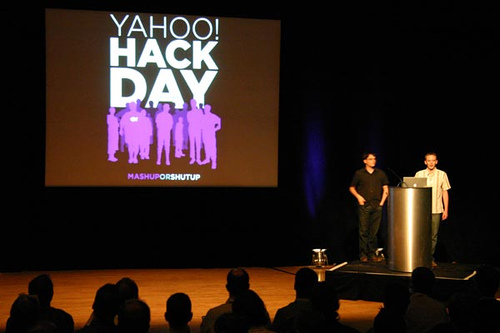
A presentation by Paul Hammond & Simon Willison, of Yahoo!

Paul and Simon gave us a quick overview of the APIs and offerings available from Yahoo.

[Paul and Simon, a Hacking Double Act]

There were many examples of mashups given, some of which included:

Flickr + Yahoo Maps = geotagged photos

One of the most interesting aspects was Yahoo's Hack Day (Mash Up Or Shut Up), which is held about once a month. Dreamers, coders and hackers from all sorts of disciplines get together to prototype possible new products. There are only two rules, apparently:
  1. Build a prototype in a day
  2. Demonstrate to your colleagues
Basically, for internal and external projects, web services and APIs allow us to build new products faster, and helps innovation. Some products demo'd at a hack day have been in user testing in under a week! This just wouldn't be possible without published APIs.

The Yahoo Developer Network has loads of information for people wishing to utilise the APIs for:
  • Search
  • Spelling suggestions
  • Term extraction (generating tags from parsed text)
  • Output formats such as XML, serialised PHP, JSON
  • Flickr
  • Maps
etc.

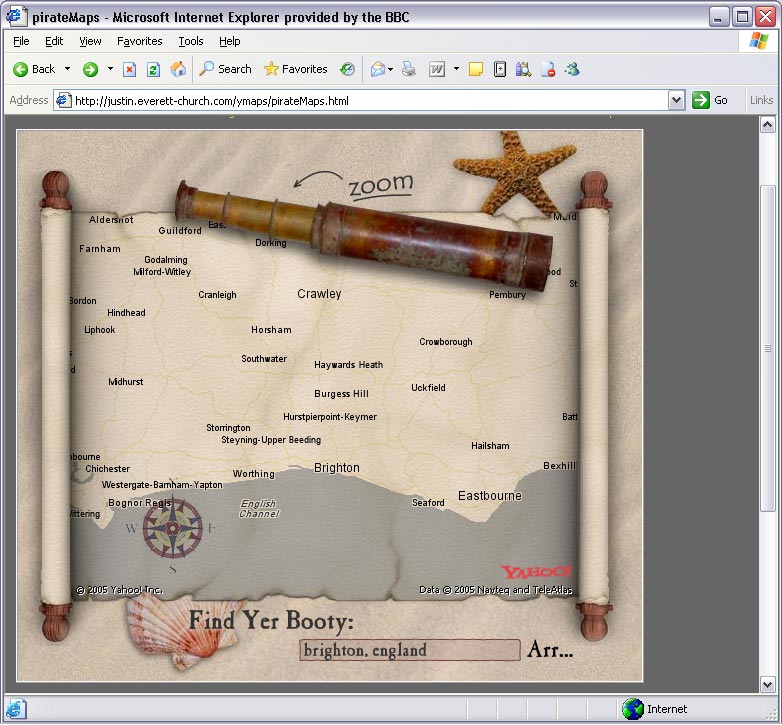
Letting your API out into the wild can lead to some very surprising results! How about fully-draggable Pirate map, courtesy of Justin Everett-Church.

[ Yarr! ]

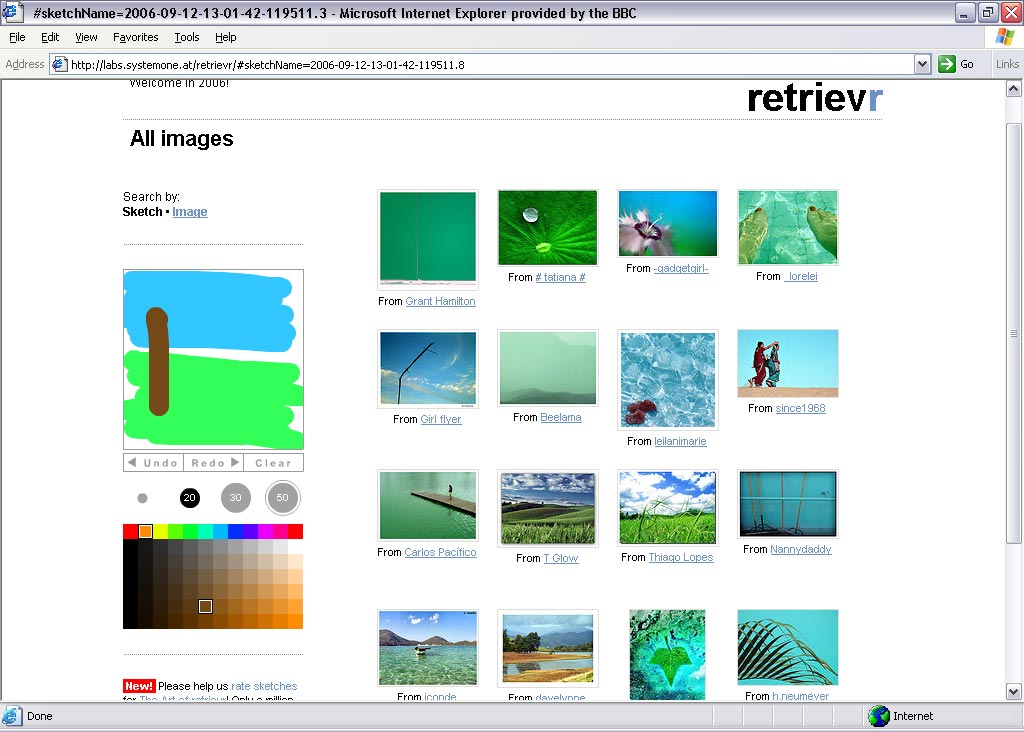
Or perhaps you need to find a picture from Flickr which matches your sketch - you need Retrievr

[Pimp up my sketch]

All the presentation slides are available at Paul Hammond's website.