Showing posts with label microformats. Show all posts

Thursday, June 07, 2007

@media - Design Interface Juggling

Dan Cederholm took us through the various elements of interface design that a good juggler should be able to "keep in the air".

[Dan and his interface-juggling octopus]

Colour
Colour evokes an emotional response in the viewer, and we need to be careful when choosing a palette. At Wellstyled.com, there's a handy widget for generating complimentary colour schemes. Try it out.

Dan had mocked up a site especially to demonstrate some of his points - go have a giggle over at ToupéePal!

One good way of choosing a palette is by taking shades from a photo - either sample direstly, or pixellate it and use some of the blocks. Dan often starts with colour as the inspiration for a site and works from there. He will re-use certain strategic colours throughout a site, eg Links, headings etc. The colour used for links will always carry weight in the design.

Typography
Great typography is actually invisible - we don't notice it. But do it badly and it sticks out like a sore thumb. He recommended the article, Web Design is 95% Typography to read.

There are a limited number of fonts we can realistically guarantee a user having on their system, but within these constraints, we can still get creative. Try using the text-transform uppercase or lowercase styles, change the letterspacing, text-align, leading etc to vary the typographical colour of a block of text. Good reading: "The Elements of Typographical Style" by Robert Bringhurst, if you can find it. Read more on applying it to the web here.

Favicons
Could be regarded as the most important design element on your site! They are the thing that represents it in the shortcut icon, browser address bar etc.

[Subtraction.com uses each site's favicon as shorthand branding for the link]

So when creating a favicon, it has to be something memorable. They must:

  • Scale well down to 16x16 pixels
  • If the whole logo doesn't work, choose a fragment to focus on
  • Use something unique about the site that still ties in with the branding
Icon files can be made with Iconographer or a plugin for Photoshop. As well as the standard 16x16 icon, 32x32 and 64x64 pixel icons can be inserted into the same .ico file. There's an interesting collection of Favicons at Delta Tango Bravo's blog.

Add Detail But Not Complexity
Understand the limitations of the browser, and suggest the box [model] but with minimal suggestions. Perhaps use just one rounded corner on an element. Re-use graphic elements where you can.

Microformats
If you site contains any sort of contact information, events lists, reviews or relationships, then you should be marking them up with Microformats. Using what works today can encourage others to do the same:

[The Microformats can be used by people, applications and as hooks for CSS]

Brian Suda did some parsing of Cork'd for Microformats, and used this information to add wine reviews (from Cork'd) to his Scrugy site, where you can learn all about wine. Corkd's Microformats had produced an accidental API. If you were to mash this up with a list of your XFN friends, you could use it as a filter for just returning reviews from your trusted sources.

Thursday, March 01, 2007

WebCards Extension For FireFox

Discovering Microformats
For viewing Microformats, and discovering them in a web page, I've blogged about Tails for Firefox in the past. But recently, I've been beta testing Andy Mitchell's excellent Webcards 0.3 extension for Firefox. So what does it do?

The first time you load a page containing Microformatted information, the green WebCards ribbon pops up at the bottom of the browser viewport to alert you. This also appears when you mouse over the bottom of the browser:

[WebCards ribbon tells you what sort of Microformats are in the page]

Playing Tag
Clicking the "Tags" link in the ribbon brings up the Tags panel:

[Default view of the "tags" panel is the Related option, allowing easy search of del.icio.us or Upcoming for the tags in question; "brian suda" in this example.]

Similarly, clicking the Feedback or Media icons gives alternative search options for that tag:


[Feedback offers to search Technorati, Media offers to search Flickr for the tag in question]

An alternate way to access the tags panel is to right click any tag on the page (which will be highlighted by the green TAG icon):

[Right-click (configurable) the TAG icon to get a floating version of the Tags panel]

Making Contact
When displaying contact information, the extension will display the blue Person icon whenever it encounters any hCard info. Right click to get the floating panel for the hCard information:

[Default view for hCard is the Information icon. Shows multiple links if they are in the hCard]

The Application icon will allow export of the hCard info to Outlook or other address book application. The Related icon shows other search options for that person:

[Related search options are LinkedIn, Google or Wikipedia]

Getting Friendly
My blogroll is marked up with XFN and when you mouse over the relevant link, WebCards will let you see the orange XFN icon. Right click and it shows relationship in the XFN panel:

[The XFN panel shows the page owner's relationship to the linked person]

Make A Date
The last major category of Microformat that I've been exploring with WebCards is of course, hCalendar. These are indicated by the little red CAL icon:

[Upcoming occasions displayed in the Calendar panel]

As with the other format panels, the Application icon lets you export the event to Outlook or Google Calendar applications; Related will search Upcoming or Google for the event:

[Add an event to my GoogleCalendar with the Applications icon]

Summing Up
So far, I've seen several iterations of this extension, and Andy has always welcomed feedback on the app. I like it a lot better than Tails for Firefox, it just seems to do more and looks much nicer - don't accuse me of being shallow, it just adds up to a nicer user experience! Anyway, I'd recommend it to anyone who is looking to get the most out of Microformats in the wild.

Wednesday, February 28, 2007

RDF - What's It Good For?

One of the presentations that I missed at BarCampLondon2 (I was attending another session) was a light-hearted debate about the similarities and differences between Microformats and RDF. The main protagonists were:

Thankfully, for those who didn't see the debate, Ian has uploaded a video of the session. It makes interesting viewing! And shortly afterwards, I found Ben Ward's insightful post about the whole subject too. I think Ben's second paragraph hits the nail on the head:
The thing about RDF is that no-one has yet demonstrated any real-world reason to care about it. It fascinates academics who would love — just for the sake of it — to model the entire universe in triples but in the real world of web browsers the value has never really been promoted.
Spot on.

The Microformats advocates have been very quick to explain what they are for, what they do, and how to implement them. I use them regularly in this blog, and try to incorporate them wherever I can into new projects. It's so easy to build them in from scratch when marking up events (hCalendar), people (XFN) or contact details (hCard).

But as yet, I'm really stumped as to what RDF - or more importantly, eRDF can do for me. Tom Morris has started a website called GetSemantic which hopes to chart the progress of developments about eRDF and spread the word. I'll be keeping an eye on it from time to time, to see what's cooking, but until then, I'll be sticking to my diet of Microformats.

Tuesday, October 24, 2006

Playpen #4 - Microformats/Too Many Tails?

Enthused by the WSG meeting on Microformats last Thursday, I thought I would update my website to include some hCard information, so put together an About Me section.

I thought I would include links to "me" elsewhere on the web, too - such as Flickr and Upcoming. The hCard spec allows for these sort of additional URLs, as long as you mark them up with class="url", which I duely did.

However, when the Tails extension for Firefox scrapes the page for Microformat info, if you have marked up multiple links with class="url" - it just takes the last one in the vCard element as the one which is displayed in the popup. I removed the class from the last link in the list, and Tails took the next one up. So, it seems Tails doesn't parse mutlitple URLs and list them too, it just uses "last man wins" as the URL to display - a shame :-( It would be nice if it took the one associated with the name or organisation element as primary. Perhaps there is a way to say which one is primary, and I'm missing the point?

In order that I don't mess up my about me page, I've taken these extra classes off it, but in order to show you what I mean, I've replicated the problem in the playpen4 page.

If anyone has any thoughts or comments, I'd be interested to hear them.

31st October - add:

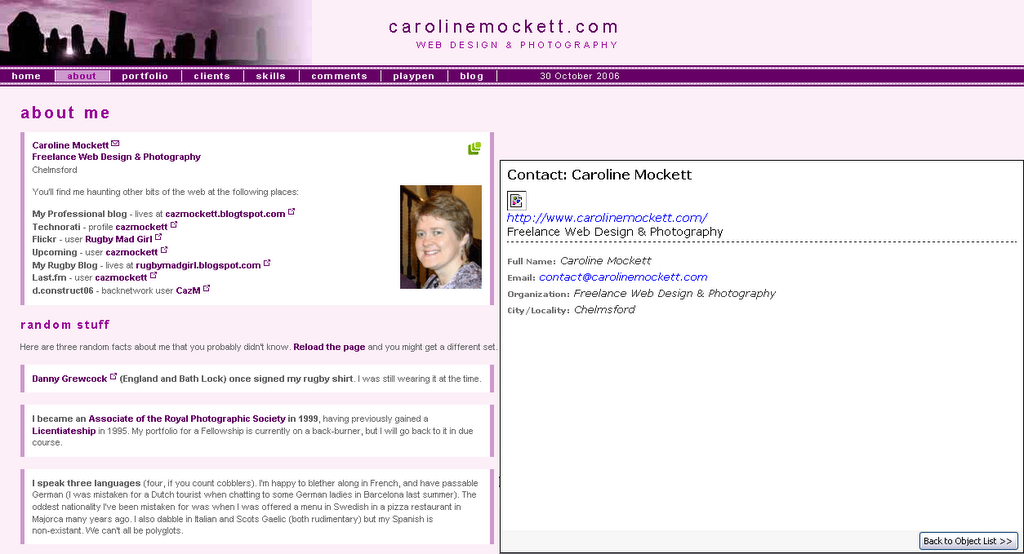
Further to Trovster's comments, here are two screenshots for my version of Tails (0.3.4):

[click for a bigger version] - Tails displays my Contact details with just one URL: the link surrounding "Freelance Web Design & Photography" is the only anchor marked up with class="url" on this page.

However, the playpen4 page looks like this with Tails:

[click for a bigger version] Tails still displays just one URL, but this time it's the last one in the hCard list marked up with class="url", this time the link for my dConstruct Backnetwork profile.

Sunday, October 22, 2006

Microformats Extension for Dreamweaver8

Having downloaded Brian Suda's Microformat Cheat Sheet, I had been methodically adding XFN and hCard info to previous blog posts by messing under the hood in split/code view. All very tedious. As I added similar stuff for the nth time, I was just thinking, "wouldn't it be nice if some clever type had written a DW extension to do this..."

No sooner thought, than found - more or less by accident, I've just discovered the Microformats Extension for Dreamweaver8 at the WaSP website. Now it really is a no-brainer to add Microformats to any page.

After installing the extension, you get the Microformats tab appear at the end of the Insert Bar:

Microformats Insert bar for Dreamweaver 8
The first icon gives you the hCal dialogue box:

hCal dialogueFill it in, and lo! and behold, you get the relevent hCal code in your page:

<div class="vevent">
<a class="url" href="http://www.mypub.com">
<abbr
class="dtstart" title="20070101T1200"> January 01, 2007 - 12:00 </abbr> - <abbr class="dtend" title="20070101T2344"> 23:44 </abbr> - <span class="summary"> My Birthday </span> - at <span lass="location"> down the pub </span> </a>
<div class="description"> Let's meet for a few New Year drinks! </div>
</div>

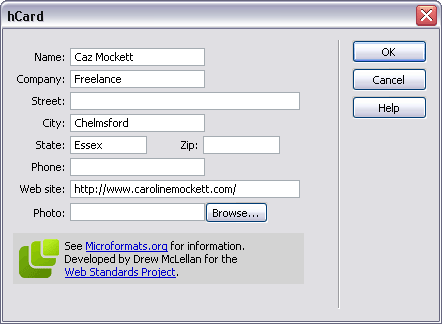
Next up is the icon for hCard, and pushing the button gives us:

hCard dialogueWhich produces:
<div class="vcard"> <a class="url fn" href="http://www.carolinemockett.com/">Caz Mockett</a>
<div class="org">Freelance</div>
<div class="adr"> <span class="locality">Chelmsford</span>, <span class="region">Essex</span> </div>
</div>

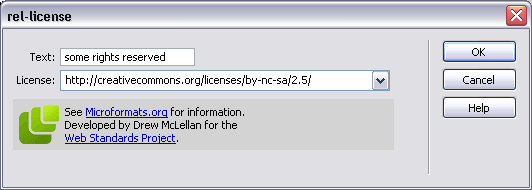
The third icon is for the rel-licence attribute:

rel-licence dialoguegiving the very simple
<a href="http://creativecommons.org/licenses/by-nc-sa/2.5/" rel="license">some rights reserved</a>
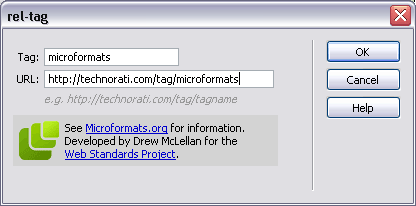
The little "luggage tag" icon gives us the rel-tag dialogue (of course):

rel-tag dialoguewhich gives us
<span class="technoratitag">
<a href="http://technorati.com/tag/microformats" rel="tag">microformats</a> </span>
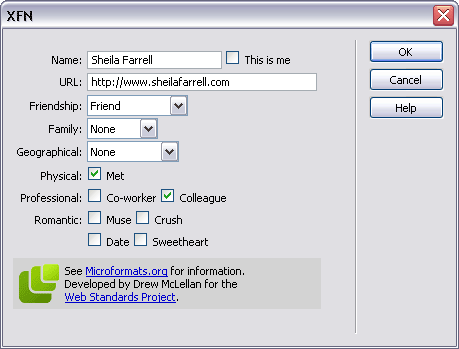
Finally, the dizzy-looking heads icon is for the XFN widget, which really is very neat indeed:

XFN dialogue
giving us this little code snippet:
<a href="http://www.sheilafarrell.com" rel="met colleague friend">Sheila Farrell</a>
Fab. All of a sudden, my life has become easier. Drew, you're a genius!


Friday, October 20, 2006

WSG London #2 - Microformats

The second London WSG meeting was all about Microformats, something I've been meaning to get to grips with for a while. What are they, and what are they good for? We had three Microformats "Ghosts" to help us understand more about them:

The Ghost of Microformats Past - Mark Norman Francis Esq of Ye Olde Yahoo! Corp. Norman gave us an overview of what Microformats are for, and why they have evolved:
  • They should be there for humans first and machines second
  • They are a way of encoding data
  • Start simply, and re-use building blocks from other standards
  • They are modular and embeddable
  • And most importantly, they should attach extra (explicit) meaning to (implicit) content.

One of the first Microformats to evolve was the XFN standard in 2003. In its simplest form, this adds the "rel" tag to an anchor link (for a person's blog, say), where you can specify your relationship to them. See my other post on XFN for more info.

In 2004, the Creative Commons Licences took off, and the rel="licence" tag was added to the Microformats arsenal, eg: Creative Commons, <a href="http://creativecommons.org/licenses/by-nc-sa/2.5/" rel="licence">some rights reserved</a>

A lot of sites have invisible meta data hidden in their pages, but which might as well be invisible - visitors can't see it, and content authors often forget to update it. Norm's phrase was out of site/sight, out of mind. If a human can't see it, the metadata might as well not be there.

He briefly discussed why using XML namespaces was considered harmful. They are not well supported, even in modern browsers, and are antisocial (giving rise to the namespaces Tower of Babel).

But on 20th June 2005, http://microformats.org was unleashed on the web community. In 15 months, there has been a huge adoption of them, basically because they are simple, sensible and extensible. Most popular have been the hCard and hCal formats, along with the rel-licence, rel-tag and afforementioned XFN.

Out in the wild, heavyweights such as WordPress, Yahoo!, Google, Technorati have adopted microformats. With a very small tweak to one of their PHP templates, Yahoo Local have suddenly made 15m new hCards available on the web!

Next up was The Ghost of Microformats Present, Mr Jeremy Keith of Clearleft

Jeremy started out by reminding us that the (X)HTML specs do not have specific tags for semantic items such as contact details, relationships, events or reviews, and with the addition of a little bit of extra markup (mainly attributes to existing elements), we can explicitly specify these things in existing markup.

  • Elemental Microformats
    • the rel attribute:
      <link href="mystyle.css" rel="stylesheet" type="text/css" />
      In this case, the rel atribute defines the relationship of the linked resource to the current document (something that had never really occurred to me until the blindingly obvious was pointed out!) Similarly, <a rel="help" href="help.html">Help page</a> might explicitly define a help document for the page containing the link.
      <a rel="tag" href="http://en.wikipedia.org/Microformats">Microformats </a>
      tells us that the link is also a tag.
      He also mentioned rel-licence and XFN as above.
    • the rev attribute:
      Less well known and trickier to get your hear round, the rev attribute defines the reverse relationship to "rel". So in the above example, on the help.html page, you might find a link thus: <a rev="help" href="checkout.html">the checkout page</a> which would say, the current page is the help resource for the checkout page.
    • the vote-for/against attribute:
      You might include a link to someone else's blog, which expresses an opion (be it negative or positive) which you agree with. Then use:
      <a rel="vote-for" href="review.html">a damning critique</a>. The rel="vote-against" is of course, the opposite (you disagree with the opinion, whether it is positive or negative)
  • Compound Microformats
    These add more than one attribute - usually classes - to elements. We mustn't forget that classes are for general purpose processing by user agents - NOT just for CSS - and should add extra semantic meaning to a document. He cited the hCard example for contact details on a blog:
    <address class="vcard">
    <a href="http://joebloggs.com/blog" class="url org">
    Joe's Blog</a> is the online home of
    <a href="mailto:me@jobloggs.com" class="email
    fn">Joe Bloggs</a>, a <span class="title">web
    developer</span> living and working in <span class="adr">
    <span class="locality">London</span>,
    <span class="country-name">England</span>
    </span>.
    </address>

Other things we need to consider are tools for creating and viewing Microformats. The hCard-O-Matic will give you a head start on writing an hCard for contact details, as will the hCal-O-Matic for events. Brian Suda's Microformat Cheat Sheet should also be a must if you're needing a quick reference guide.

On the discovery end of things, the Tails extension for Firefox is great for finding microformats on a page. For those folks not running Firefox, John Hicks has written a client-side stylesheet to highlight microformats, and he's updated it already. Tantek's microformats favelets let you copy hCard or hCal information into your address book or calendar. And Technorati have started to index microformats too!

Jeremy has kindly put his slides together as a PDF - but they're never as much fun as seeing them delivered "live" ;-)

Finally, a taste of things to come? The Ghost of Microformats Future, aka Drew McLellan , also of Yahoo! Europe, and a member of WaSP

Drew immediately got everyone's attention by asking, could using Microformats on your current site effectively replace your API? He demonstrated numerous instances where complex calls to APIs could be supplanted with the relevent microformat codes in the page, and pretty much showed us what they could become given enough widespread adoption. You cane see Drew's slides online, as I didn't have time to scribble all the fiddly bits of code he demonstrated.

One site which has no API but is littered with useful microformats is corkd.com. You can extract contact info or reviews at will, if you have the right plugin widgets.

Drew also drew our attention to some useful tools:

Brian Suda's X2V transformer - takes XHTML hCal/hCard and munches them into vCard/iCalendar files. Then there's Drew's new tools.microformatic.com site.

Questions and answers were welcomed by our Three Musketeers. Yahoo! memory sticks were given out as goodies to anyone who asked a question. One interesting question that stuck in my mind was asking if there were any microformats for mobile? Jeremy quipped that they are smaller than that, and there's more information on picoformats at the microformats wiki.

A very long post; wrapping up I'll say we all enjoyed a beer with the other geeks in the pub afterwards! Thanks to Stuart for organising the meet. He's already put up the podcast feed from the event. I'm looking forward to the next one, whenever that comes round.

Friday, August 25, 2006

Why Not Tag Along Too?

I've been quiet on the blogging front lately, just rather busy to keep up!

Today I was sent an invitation to the d.Construct2006 Backnetwork, which is a great site for attendees of the upcoming d.Construct event in Brighton on 8th September. If you're not already signed up, I'm afraid you will have to wait until next time, as they are full. But the Backnetwork site provides an excellent place for attendees to "meet", chat, review etc. All the better if you forget to give someone your business card at the event; if you know their name, you can go look them up on the site afterwards.

I will post more on the actual event once it happens. But as I was browsing the Backnetwork site, I stumbled across references to XFN - short for XHTML Friends Network. It's a great way of adding extra meaning to links in your blogroll, for instance, which tell others who are reading, about your relationship with the person concerned. It's dead easy to implement (read the four easy steps showing you how to go about it). In it's simplest form, you just add an extra rel="met" tag to any links for people you have actually met in person. So if I had met the ficticious Joe Bloggs and wanted to add his blog to my blogroll, I would use:

<a href="http://joebloggs.com/blog" rel="met">Joe's Blog</a>.

If he was also a friend, I would add rel="friend met". There are a few other options, (which you can read about in more detail here), but it's pretty simple to remember, and will add a human dimension to ordinary links.

So I thought I would XFN my blogroll so you can see who's who. Why not tag along and make your blogroll XFN-friendly too?