Showing posts with label hCard. Show all posts

Thursday, March 01, 2007

WebCards Extension For FireFox

Discovering Microformats
For viewing Microformats, and discovering them in a web page, I've blogged about Tails for Firefox in the past. But recently, I've been beta testing Andy Mitchell's excellent Webcards 0.3 extension for Firefox. So what does it do?

The first time you load a page containing Microformatted information, the green WebCards ribbon pops up at the bottom of the browser viewport to alert you. This also appears when you mouse over the bottom of the browser:

[WebCards ribbon tells you what sort of Microformats are in the page]

Playing Tag
Clicking the "Tags" link in the ribbon brings up the Tags panel:

[Default view of the "tags" panel is the Related option, allowing easy search of del.icio.us or Upcoming for the tags in question; "brian suda" in this example.]

Similarly, clicking the Feedback or Media icons gives alternative search options for that tag:


[Feedback offers to search Technorati, Media offers to search Flickr for the tag in question]

An alternate way to access the tags panel is to right click any tag on the page (which will be highlighted by the green TAG icon):

[Right-click (configurable) the TAG icon to get a floating version of the Tags panel]

Making Contact
When displaying contact information, the extension will display the blue Person icon whenever it encounters any hCard info. Right click to get the floating panel for the hCard information:

[Default view for hCard is the Information icon. Shows multiple links if they are in the hCard]

The Application icon will allow export of the hCard info to Outlook or other address book application. The Related icon shows other search options for that person:

[Related search options are LinkedIn, Google or Wikipedia]

Getting Friendly
My blogroll is marked up with XFN and when you mouse over the relevant link, WebCards will let you see the orange XFN icon. Right click and it shows relationship in the XFN panel:

[The XFN panel shows the page owner's relationship to the linked person]

Make A Date
The last major category of Microformat that I've been exploring with WebCards is of course, hCalendar. These are indicated by the little red CAL icon:

[Upcoming occasions displayed in the Calendar panel]

As with the other format panels, the Application icon lets you export the event to Outlook or Google Calendar applications; Related will search Upcoming or Google for the event:

[Add an event to my GoogleCalendar with the Applications icon]

Summing Up
So far, I've seen several iterations of this extension, and Andy has always welcomed feedback on the app. I like it a lot better than Tails for Firefox, it just seems to do more and looks much nicer - don't accuse me of being shallow, it just adds up to a nicer user experience! Anyway, I'd recommend it to anyone who is looking to get the most out of Microformats in the wild.

Wednesday, February 28, 2007

RDF - What's It Good For?

One of the presentations that I missed at BarCampLondon2 (I was attending another session) was a light-hearted debate about the similarities and differences between Microformats and RDF. The main protagonists were:

Thankfully, for those who didn't see the debate, Ian has uploaded a video of the session. It makes interesting viewing! And shortly afterwards, I found Ben Ward's insightful post about the whole subject too. I think Ben's second paragraph hits the nail on the head:
The thing about RDF is that no-one has yet demonstrated any real-world reason to care about it. It fascinates academics who would love — just for the sake of it — to model the entire universe in triples but in the real world of web browsers the value has never really been promoted.
Spot on.

The Microformats advocates have been very quick to explain what they are for, what they do, and how to implement them. I use them regularly in this blog, and try to incorporate them wherever I can into new projects. It's so easy to build them in from scratch when marking up events (hCalendar), people (XFN) or contact details (hCard).

But as yet, I'm really stumped as to what RDF - or more importantly, eRDF can do for me. Tom Morris has started a website called GetSemantic which hopes to chart the progress of developments about eRDF and spread the word. I'll be keeping an eye on it from time to time, to see what's cooking, but until then, I'll be sticking to my diet of Microformats.

Tuesday, October 24, 2006

Playpen #4 - Microformats/Too Many Tails?

Enthused by the WSG meeting on Microformats last Thursday, I thought I would update my website to include some hCard information, so put together an About Me section.

I thought I would include links to "me" elsewhere on the web, too - such as Flickr and Upcoming. The hCard spec allows for these sort of additional URLs, as long as you mark them up with class="url", which I duely did.

However, when the Tails extension for Firefox scrapes the page for Microformat info, if you have marked up multiple links with class="url" - it just takes the last one in the vCard element as the one which is displayed in the popup. I removed the class from the last link in the list, and Tails took the next one up. So, it seems Tails doesn't parse mutlitple URLs and list them too, it just uses "last man wins" as the URL to display - a shame :-( It would be nice if it took the one associated with the name or organisation element as primary. Perhaps there is a way to say which one is primary, and I'm missing the point?

In order that I don't mess up my about me page, I've taken these extra classes off it, but in order to show you what I mean, I've replicated the problem in the playpen4 page.

If anyone has any thoughts or comments, I'd be interested to hear them.

31st October - add:

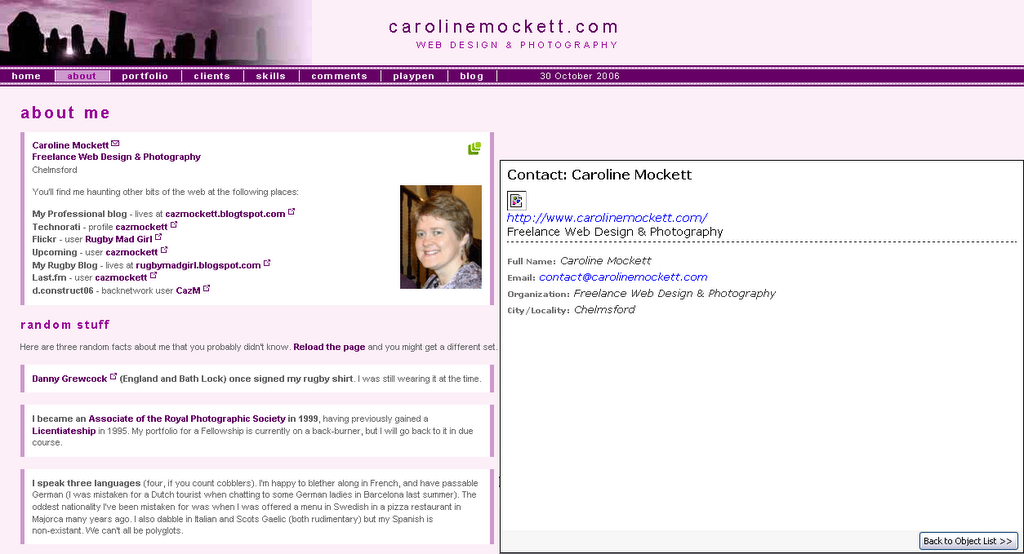
Further to Trovster's comments, here are two screenshots for my version of Tails (0.3.4):

[click for a bigger version] - Tails displays my Contact details with just one URL: the link surrounding "Freelance Web Design & Photography" is the only anchor marked up with class="url" on this page.

However, the playpen4 page looks like this with Tails:

[click for a bigger version] Tails still displays just one URL, but this time it's the last one in the hCard list marked up with class="url", this time the link for my dConstruct Backnetwork profile.

Sunday, October 22, 2006

Microformats Extension for Dreamweaver8

Having downloaded Brian Suda's Microformat Cheat Sheet, I had been methodically adding XFN and hCard info to previous blog posts by messing under the hood in split/code view. All very tedious. As I added similar stuff for the nth time, I was just thinking, "wouldn't it be nice if some clever type had written a DW extension to do this..."

No sooner thought, than found - more or less by accident, I've just discovered the Microformats Extension for Dreamweaver8 at the WaSP website. Now it really is a no-brainer to add Microformats to any page.

After installing the extension, you get the Microformats tab appear at the end of the Insert Bar:

Microformats Insert bar for Dreamweaver 8
The first icon gives you the hCal dialogue box:

hCal dialogueFill it in, and lo! and behold, you get the relevent hCal code in your page:

<div class="vevent">
<a class="url" href="http://www.mypub.com">
<abbr
class="dtstart" title="20070101T1200"> January 01, 2007 - 12:00 </abbr> - <abbr class="dtend" title="20070101T2344"> 23:44 </abbr> - <span class="summary"> My Birthday </span> - at <span lass="location"> down the pub </span> </a>
<div class="description"> Let's meet for a few New Year drinks! </div>
</div>

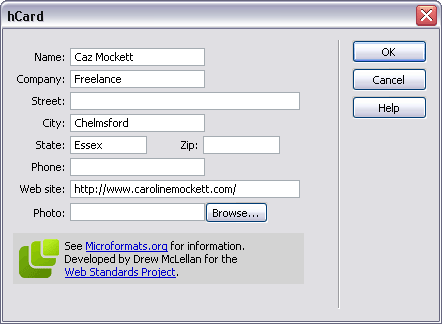
Next up is the icon for hCard, and pushing the button gives us:

hCard dialogueWhich produces:
<div class="vcard"> <a class="url fn" href="http://www.carolinemockett.com/">Caz Mockett</a>
<div class="org">Freelance</div>
<div class="adr"> <span class="locality">Chelmsford</span>, <span class="region">Essex</span> </div>
</div>

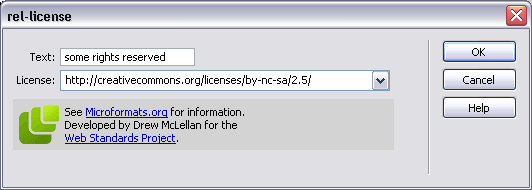
The third icon is for the rel-licence attribute:

rel-licence dialoguegiving the very simple
<a href="http://creativecommons.org/licenses/by-nc-sa/2.5/" rel="license">some rights reserved</a>
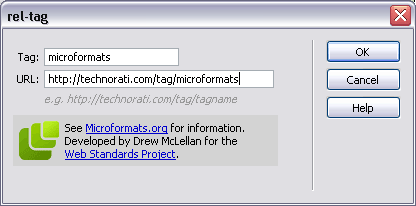
The little "luggage tag" icon gives us the rel-tag dialogue (of course):

rel-tag dialoguewhich gives us
<span class="technoratitag">
<a href="http://technorati.com/tag/microformats" rel="tag">microformats</a> </span>
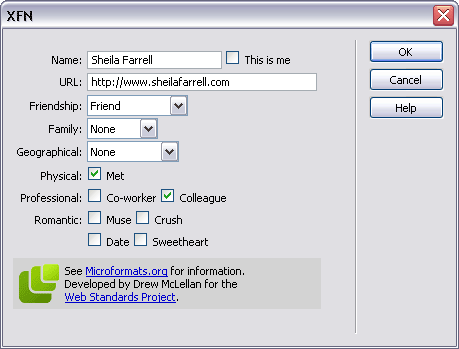
Finally, the dizzy-looking heads icon is for the XFN widget, which really is very neat indeed:

XFN dialogue
giving us this little code snippet:
<a href="http://www.sheilafarrell.com" rel="met colleague friend">Sheila Farrell</a>
Fab. All of a sudden, my life has become easier. Drew, you're a genius!