Thursday, January 04, 2007

Upgrades That Suck

Upgrades, gotta love 'em.

As it turned out, I foolishly accepted the offer of an upgrade to Windows Media Player 11 a couple of days ago. It all looked to have gone smoothly to begin with, and in fact I like the look of it - seems easier to find things and is a much nicer interface, all in all.

So I ripped a couple of CD's I'd been meaning to put on my PC for a while, then connected my MP3 player. And... nada. Well, the helpful error message said words to the effect that my player was using an old USB driver which was no longer supported, and I should go get a new one. Great! It was getting very late, so I decided not to wrestle with it and left it til the next day.

The player in question is a Creative Nomad Jukebox Zen NX (nice and snappy that, ha), so I hopped over to Creative Europe's website and downloaded the latest USB driver and installed that. Still the same error message.

A bit of Googling later, and I found that WMP11 has "known issues" with Zen portable devices. It would have been nice to have been told this before I did the upgrade, Microsoft! The suggested bodge fix is to roll back to WMP10, upgrade the firmware on the Jukebox and reinstall WMP11.

OK, I'll give that a go. Except that, having trawled around Creative's support site (again) and found the supposedly correct firmware upgrade, I get this lovely little error message when trying to run it:
Brilliant! So I send off an email to Creative's Support asking just which file I should be using, and sit back to wait for a reply.

Meanwhile, there's a troubleshooting bit on Creative's site which suggests another possible bodge fix if the device is seen in Device Manager (it is) but not recognised by WMP10 (it isn't). I follow the instructions which get me to mess about with the registry! And it still does nada.

Last resort is the section of Microsoft's Readme for WMP11 which says your player might have problems after rolling back to v10; uninstall the USB device in Device Mangler™, disconnect device and reconnect, forcing Windows to reinstall. Still five parts of you know what.

So now I've got the (un)shiny Media Player 10 back on my system but I'm not even back to square one as the Jukebox is still not being recognised.

Thank you Creative Labs, and Microsoft, for wasting at least three hours of my time. And I'm still not done. You need your collective heads banging together. I don't care who's problem it is, but it shouldn't be mine.

Wednesday, January 03, 2007

Property Is Theft

19th-Century French politician Pierre-Joseph Proudhon might have coined the phrase, but it's still pretty relevent today. As a soon-to-be-freelance web designer and photographer, I was particularly alarmed to read Sion Touhig's piece at The Register, about how the glut of freely- (or cheaply-) available images on the web has "devasted" the freelance photography and photojournalism sector. Not only is content on the web more easy to pinch, but also the rise in "user generated content" has made things increasingly difficult. He states:

"User Contributed Content should be more accurately termed 'Audience Stolen Content', because media groups rarely pay for Citizen Journalism images and more often than not, either claim the copyright or an all-encompassing license from contributors, when they send their pictures in. That's a copyright grab in all but name."
The article runs to three pages and make many other salient points, but this one stuck out too:
"The perception is "if it's on the web, it's either free, or I'm gonna nick it anyway because, hey, 'they' can afford it". The reality is that there are now more copyright-free or near-free images on the web than copyright images. Most of them will be on Flickr (owned by Yahoo!), MySpace (owned by Rupert Murdoch's News Corporation) or the major corporate image portals. Neither Flickr nor MySpace exist to commercially leverage images, but clients now go there trawling for free content, so they don't have to pay a photographer for it. It has caused a crash in the unit cost of any images which aren't given away and which are licensed for profit."
As a victim of copyright theft in the past, I can entirely sympathise with his point of view. In my case, I was minding my own business reading one of the broadsheets' weekend colour suppliments a few years ago, when I stumbled across a picture which I knew incontrovertibly to have been stolen from one of my websites and used without my permission. After writing an incensed letter to the paper's picture editor, they freely admitted that it was their fault (blaming a lazy researcher for not checking the copyright status of the image!) and agreed to pay me their standard repro fee.

It took another 4 letters and six months for them to finally honour their promise. And that was for a picture which wasn't particularly important or valuable, and would not have earned me anything anywhere else - it was just for the principle of it that I pursued them. What would have happened if I hadn't spotted it? I wonder how many more times newspapers get away with this sort of thing - not to mention the millions of folks online who can trawl the web for all of your pictures and do with them what they will.

And I'm afraid that's why you'll find I put a copyright watermark in all my images which I put online - they're usually only 600x400 resolution too. And my Flickr images aren't tagged with a Creative Commons licence. Once bitten, twice shy.

On a related note, recently a client gave me a brief, and I worked up a proposed site layout. But despite me following the brief, the client was not happy and has basically admitted they want me to rip off the design of another site! I flatly refuse to do so. Asking me to do this would basically be asking me to throw away my professional integrity and risk being sued for breach of copyright.

Fortunately, there was PR agency inbetween me and the client in question, who managed to mediate the situation. They were pretty much in agreement with me that it wasn't not a healthly thing to be suggesting. And from a prospective customer's point of view, I wouldn't be too impressed if I found a site which had obviously pinched a design from a competitor - that wouldn't say much for the company's buisness ethics!

Tuesday, January 02, 2007

Tagged By Sheila

Sheila The Sheila has tagged me with a little blog ditty, and in the spirit of New Year I thought I would carry it on. The idea is this:

"For those of you going "huh?", I have been blog tagged, a game started by Jeff Pulver which seems to be spreading quite quickly. The object of the game is to reveal 5 things about you, which most readers probably don't know, then nominate 5 friends to do the same."
So, here are my five "surprises":
  • I had my first photograph published when I was 8 years old.
    It was taken when I was seven, at Darnholm, on the North Yorkshire Moors Railway. I used my father's manual camera (he had set the exposure for me) and managed to pan the shot when the steam train came round a curve under the bridge. Dad regularly submits pictures for publication in preserved railway magazines, and so he sent it along with some of his, and it was published in Modern Railways. So I'm a bit of a closet steam-head as well as nethead.
  • I mushed a team of six huskies for a week in the arctic circle.
    We toured northern Sweden and Norway. It was the best trip I've ever done, but totally knackering. We ate for England, but expended so much energy, I'd lost 4lbs by the time I came home. My experiences during that week have taught me that teamwork is invaluable, and that plastic is not as good as polystyrene for making loo seats for use in sub-zero temperatures!
  • I started learning to play Bass Guitar in 2002.
    I'd wanted to play bass since I was a teenager. Then one day I woke up and thought, "why don't I just go and buy one, rather than dithering all this time?" Not sure the neighbours were pleased. But my amp doesn't go up to 11! I started out with a cheap 4-string model, but now have a custom 5-string Iceni Funkmeister, with a purple paint job. I guess I'm a late starter when it comes to rebellion and rock-goddess pretentions, ha ha.
  • I'm a PAGB-accredited judge, and regularly visit photographic clubs in East Anglia and North London, to judge their competitions. For some reason, they like my opinions and keep inviting me back.
  • Danny Grewcock (England and Bath Lock) once signed my rugby shirt. I was still wearing it at the time. 'Nuff said.
And I'm going to tag these good folks to reveal themselves: Litlove, Andy Mitchell, Bobble, Prof. John Flood and his RATS, FakeBob.

Friday, December 15, 2006

Lies, Damned Lies, And Statistics

No matter who coined the phrase, it has often been used to cite the inaccuracy of some conclusions which can be drawn from analysing statistics. I'm usually pretty wary of them myself, but sometimes your server stats are your best friend.

I have recently been involved with the redesign of a website which has been online since the end of 2003. It was originally written by another team, and it contained many nested tables, a few styles, but basically not terribly semantic. The team I work with have been looking after the site's content since it's original launch, and a few months ago, the site owner came to us to ask if we could give it a fresh new look, and a bit of a re-organisation. It had grown organically since it's inception, and things had got a little muddled. It was felt that documents in certain areas of the site just weren't being found.

We undertook some user-centred design, testing our new proposals with paper wireframes and some open and closed card sorting. On the basis of these results, we tinkered a bit more and tested again. Then we set about reorganising the content and making much more semantic pages - lists of documents were coded as a list. I'll admit that one table remains for the basic layout, but this was pretty much proscribed by the templating system in use on the server. Everything else has been pared down to provide minimum tag soup.

On 1st November, the new-look site was relaunched. Fast forward a month, and I ran a statistics check on the site, comparing results from October 2006 (old style) and November 2006 (after relaunch). The results were startling.

October - Access Statistics

  • Total page impressions: 98,037
  • Top URL was the site root (no surprise)
  • 4th was the search page, with 1,530 hits.
  • That suggested people weren't finding what they were looking for.
  • "Responses" section (where the bulk of the answers to the public's FOI requests were published) was at 46th, with only 262 hits.
  • We were regularly publishing responses to very similar questions - because users didn't find them on the site before making their own request.
November - Access Statistics
  • Total page impressions: 108,632
  • Top URL was site root, 2nd was the new "responses" index page, with 1,658 hits.
  • Search page had plummeted to 437th - with a mere 24 hits!
  • Other (new) subpages of the responses section were getting plenty of traffic as people explored the new way of accessing the documents.
  • We are still publishing lots of responses to requests, but the number of near-duplicate queries has dropped significantly.
Page Weight Statistics
Some pages were completely re-structred in terms of their content, but about 20 pretty much retained their original information - it was just recoded from tables to lists. I did some analysis on these as a before and after comparison too.

The smallest page started out at 16Kb, and went down to 7Kb (56% reduction); the largest page was originally 119Kb and dropped to 20Kb (83% reduction). On average these 20 files' sizes were reduced by 73%. Not bad in itself, but when you multiply that by the number of page impresesions, you get an idea of the considerable reduction in bandwidth being used.

Conclusions
So there you have it - some numbers to back up the priciples of good user-centred design. I felt that the search page statistic was the most significant - and certainly backed up the old adage that if you have a decent navigation and information hierarchy, people won't need to use the search but will naturally find things themselves.

Pub Standards Party

As if last Saturday's BBC Backstage Xmas party wasn't enough, a group of hardy drinkers gathered last night for the Pub Standards Christmas party.

Much beer was consumed. It was Norm!'s birthday, and he'd very kindly paid for food to be provided, so the gannets soon swooped and demolished that too. The CSS Div had made a very sticky chocolate confection in Birthday Boy's honour, and that was handed round. Very rich, one tiny piece could send you into hyper-glycemic shock.

Frances was quite tipsy, although she's sworn me to secrecy on that one. Oops! And before I left, Matt and Patrick had persuaded me to go along to Matt's birthday showing of Raiders Of The Lost Ark tomorrow. Renting the whole cinema! Extravagance, or what? Most of us just rent the DVD. Ah, well, I could not provide a good alibi for not attending, so I'll be in the audience at 3pm - Matt might even give me a free "John Wayne" badge...

Thursday, December 14, 2006

A Quick Roundup

Screen Reader Demo
I've been very poor at keeping up with my blogging of late. I meant to post a few days ago after attending an excellent Screen Reader demo at Test Partners. Steve Green led the session, and John Welsman (Freelance Assistive Technology Consultant) amazed us all with his speed and dexterity at negotiating the web with JAWS. John also brought along his lovely dog, Dalton, who sat very quietly in the corner all afternoon.

It's only when you witness a blind user having to negotiate the tag soup and badly muddled code that still makes up a huge proportion of the web, that you really appreciate why semantic markup is so important.

  • A website may look great, but take off those stylesheets, and if there are no headings in a document, the user has no way of knowing which sections are which, without wading through loads of text.
  • Jaws will announce how many items are in a list, so it can be very easy to get a mental picture of the navigation items, if they are marked up this way, rather than dumped in a table.
  • A visually impared user builds up a mental model of the page in a completely different way to a sighted user - they have no sense of left or right, everything is top-down - so source order of your code is vital in aiding their understanding.
  • Consistency is the byword - not just in the way things look, but in source order, for instance. Markup pages the same way, and you will give a blind user a head start in visualising the next page they visit on your site - because some of the mental model will still apply from previous pages they may have visited.
Frances also did a writeup of the event, and so I won't repeat too much stuff here. Steve Green also makes some excellent comments on Frances' post.

BBC Backstage Xmas Bash
The geek Christmas event of 2006 was great fun, at The Cuban bar in Citipoint. Ably organised by Ian Forrester, nearly 400 folks attended. It was really nice to catch up with The Usual Suspects, and I was also able to chat with a few people I hadn't had the pleasure of talking to before, including Eric Meyer, who was in London running a 2-day Carson Workshop. I'm kicking myself that I wasn't able to go along to share Eric's knowledge, but work wouldn't pay! Maybe next time?

Glutton For Punishment
Talking of parties, I'm just about to head off to the Pub Standards Christmas party this evening, so I better get my skates on...

Wednesday, December 06, 2006

Cowboys (Me) And Indians (That'll be Apache)

I'm A PHP Newbie
For some weeks, I've been meaning to try my hand at some PHP development, having done most of my projects to date with .NET. I bought the excellent book Blog Design Solutions in September, and have been gradually reading my way through it in my spare time. It gives advice on installing and tweaking some of the most common blog engines such as Movable Type, ExpressionEngine, WordPress and TextPattern, but the last chapter leads you through building your own blogging solution.

I thought this was a good place to start for a PHP newbie, since there were copious examples and plenty of advice about setting up your test environment, a notorious minefield to tread safely on your own.

Setting Up The Test Environment
Unfortunately, this is where the pain and suffering began... I downloaded the lastest stable Apache release (as adivsed by the book), which was supposedly 2.2.3, as the Win MSI installer. It half loaded up, but would not run as a service on my WinXP Pro machine. The Apache icon appared in my SysTray, but the context menu was blank, and it did not appear in my list of services to start manually! After going round the loop several times, I gave up and went back for the 2.0.59 release instead - which worked first time!

Because I've already got IIS running as my default web server on localhost, I had to tell Apache to use a different port - 8080 is the conventional one for a second web server. Then you can use this in your URL to call on Apache to serve your pages:

http://localhost:8080/blog/index.php
I had already installed MySQL 5.0.22 a while back, along with useful tools such as the accompanying Administrator, Query Browser and Migration Toolkit, but had not really used any of it in anger since.Consequently, it took a few minutes to remember what I'd chosen as the root password for the MySQL Administratior package! Eventually, I set up my database (all very straightfoward with the Admin plugin, you don't have to go messing about with SQL statements to make a new table etc, it's all done from a neat little GUI). I'd also got PHP 5.2.0 installed by now.

Connecting To The Database
The next hurdle came when I tried actually running a PHP page with a database connection. I kept getting an error:
Call to undefined function mysql_connect()
After some reading around in my book Beginning PHP and MySQL 5 book (another one which has been propping up the coffee table of late but came into it's own for this), it turns out that PHP5 does not ship with native MySQL support embedded; you have to download some extra libraries and then go fiddling around with the php.ini file. I found this tutorial page really useful in explaining what was needed. And for all the knocking that Microsoft gets in various quarters, I don't ever remember this much effort being required to set up IIS to run with the .NET framework! Bah, humbug.

Once the environment was properly configured, the actual blog development wasn't too bad. I had a few "moments" of frustration trying to chase down some syntax typos which caused various things to blow up, but you get used to that with hand coding!

Telling The Time
Another tricky thing to get right is date and time formatting. My PHP book gave me info if you want to use PHP to display the current date:
<?php echo "".date("l, jS F, Y"); ?>
Gives you "Wednesday, 6th December 2006".

There are occasions when you want to format the date in the SQL statement, and trying to get your head round a seemingly-arbitrary set of case-sensitive parameters in the format string is difficult. Which is where Dan Winchester's guide to MySQL date_format was also very handy. You might use something like this:
SELECT post_id, title, post
DATE_FORMAT(postdate, '%W, %D %M %Y') AS dateposted, DATE_FORMAT(postdate, '%H:%i') AS timeposted
FROM posts WHERE post_id=$post_id LIMIT 1
dateposted would display "Wednesday, 6th December 2006" as before, and the timeposted variable shows "22:45". I split these in two so the parsed date string could be displayed separately from the time portion - if you made two posts in a day, it's nice not to repeat the day/date element every time. If you wanted to lump them together, just use this instead:
SELECT post_id, title, post
DATE_FORMAT(postdate, '%W, %D %M %Y' at %H:%i) AS dateposted
FROM posts WHERE post_id=$post_id LIMIT 1
This will give "Wednesday, 6th December 2006 at 22:25" as one string.

Future Developments?
So now, I have my own blogging engine running on my localhost using PHP and MySQL. I'm not about to share the new blog with the world, as it largely consists of a personal diary and various rants, but it's been a very worthwhile exercise in dipping my toes in the murky PHP waters.

I may decide to develop the code further, and perhaps use it to host this blog on my own server in due course, but for the moment, it's staying right here at blogger.

Wednesday, November 22, 2006

Playpen #7 - Flickr API

With my new-found ability to consume RSS (and by inference, any XML), my next challenge was to combine that with Playpen # 2 - Lightbox JS and the Flickr API and see what fun I could have.

Firstly, I logged into Flickr and found a suitable photo set of mine to play with, taking note of the setID. Browsing the API documentation, I found the API Explorer page very useful. It gives you some handy values straight away, such as your userID, plus recent photoIDs, setIDs and contactIDs.

If you put the SetID in the form on the Explorer page, and call the method (I used an unsigned call, since I was only interested in displaying pictures, not writing details or uploading), the XML file for your photo set is returned, along with the all-important URL you can use to call the method from your web page.

Whilst I didn't actually need to save this generated XML file, I did find it useful to see exactly what was what in terms of the schema - sometimes seeing an actual value tells you an awful lot more than just seeing the name of an element or attribute.

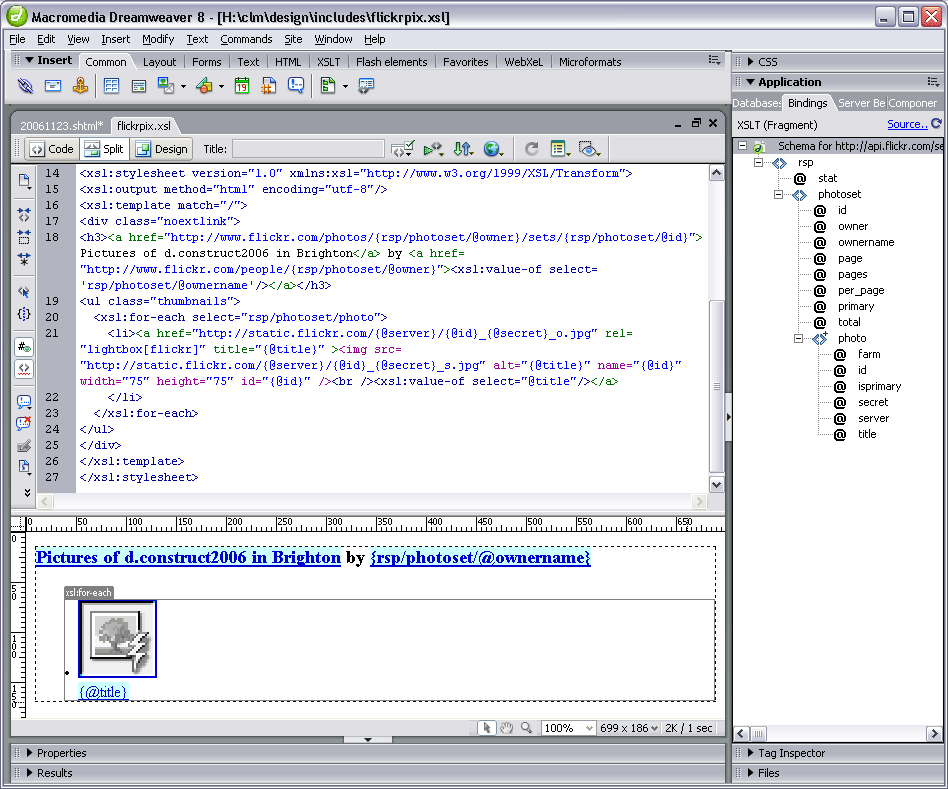
I then used Dreamweaver8 to generate a new XSL fragment file, which calls the aforementioned URL as its source. This gives you a display of the XML schema in the bindings panel. You can then drag and drop elements and attributes (relatively) painlessly onto your XSL document:

The nuts and bolts of my stylesheet are as follows:

<xsl:stylesheet version="1.0" xmlns:xsl="http://www.w3.org/1999/XSL/Transform">
<xsl:output method="html" encoding="utf-8"/>
<xsl:template match="/">
<h3>
<a href="http://www.flickr.com/photos/{rsp/photoset/@owner}/sets/
{rsp/photoset/@id}">Pictures of d.construct2006 in Brighton</a>
by <a href="http://www.flickr.com/people/{rsp/photoset/@owner}"><xsl:value-of select='rsp/photoset/@ownername'/></a>
</h3>
<ul class="thumbnails">
<xsl:for-each select="rsp/photoset/photo">
<li><a href="http://static.flickr.com/{@server}/{@id}_{@secret}_o.jpg" title="{@title}" >
<img src="http://static.flickr.com/{@server}/{@id}_{@secret}_s.jpg" alt="{@title}" name="{@id}" width="75" height="75" id="{@id}" />
<br /><xsl:value-of select="@title"/></a></li>
</xsl:for-each>
</ul>
</xsl:template>
</xsl:stylesheet>
The Photo Source URLs page was extremely useful in telling me what paths I needed to construct for the image thumbnails and originals. Even so, I spent a frustrating half hour getting the syntax right. I learned the hard way that copy/paste in the code view doesn't always get you the right path - but if you drag an attribute from the bindings panel onto the design view of the file (not the code view), the path is sorted out for you!

Basically, I was mistakenly adding:
{rsp/photoset/photo/@attribute}
instead of just {@attribute}, in the loop, and nothing showed up. But the overall title bit worked fine - because this was outside the loop, and did require the rest of the path to parse correctly. Argh!

With a bit of CSS styling, the photoset is displayed nicely in Playpen #7. Clicking the title or thumbnail then brings up the LightboxJS function to display the original image from Flickr, with it's title and prev/next links to the other pictures in the set.

RSS - Consumer Indegestion

As well as problems generating my own RSS feeds, I've been banging my head against the Adobe brick wall as far as consuming RSS is concerned.

Dreamweaver8 is my weapon of choice for development (so shoot me), and I tried a few months ago to get the BBC's Rugby Union RSS feed added to my rugbypix.com page. Adobe have a tutorial which explains a lot. Trouble was, I did everything they said, and on my localhost test environment, I kept getting an error message:

MM_XSLTransform error:
"http://newsrss.bbc.co.uk/rss/sportonline_uk_edition/rugby_union/rss.xml" is not a valid XML document.
The underlying connection was closed: Unable to connect to the remote server.
The claim that it wasn't a valid XML document was obviously rubbish, since the BBC's feed works in all the feed readers I've tried! Googling for the error didn't produce anything sensible, so I shelved the project and put it on the back burner for a while.

Returning to it this afternoon, I tried uploading the XSL fragment (which does the data repeat for the feed) and the page in which the transformation is called, onto my live server. I got a different message - the MM_XSLTransform.cs file was missing - progress! I knew that on my previous attempts, the only transform I could find available was the MM_XSLTransform.vb file, which was the wrong server model for my site.

Another quick google for the C# transform got me to this page. And, voilà! a link to download the missing MM_XSLTransform.cs. Bung it in the includes/MM_XSLTransform/ folder and upload it to the site, and Bob's your uncle... BBC Sport Rugby Union feed at rugbypix.com

Great, another niggling problem ticked off my list!

Monday, November 20, 2006

20x2 v6.5 - Where Am I?

I had fun at last night's 20x2 event, which was well attended by those keen to see the first event held outside Texas. The speakers were:

  1. allison pickett (artist)
  2. steve day (comedian)
  3. jaye joseph (designer)
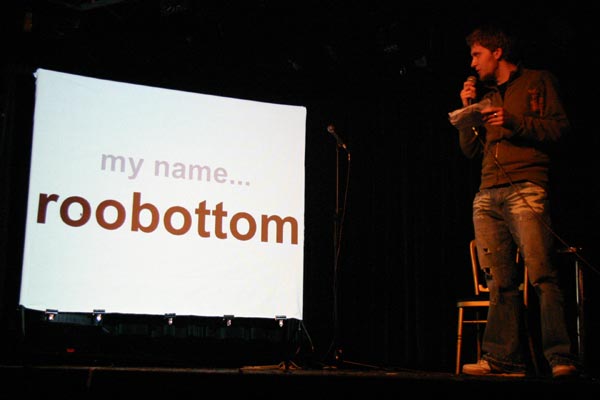
  4. jon roobottom (designer)
  5. ann mcmeekin (designer/photographer)
  6. steve marshall (developer/designer)
  7. bobby pathak (journalist)
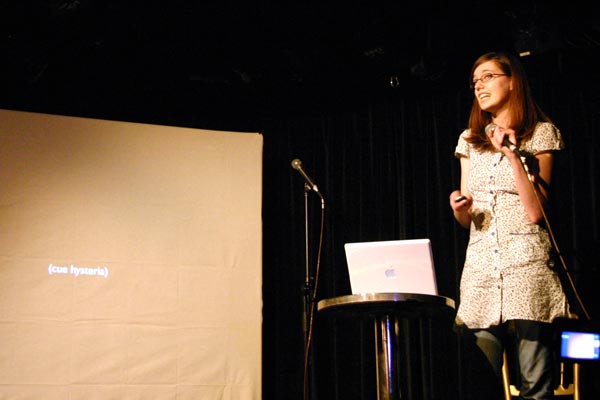
  8. frances berriman (designer)
  9. diego brown & the good fairy (band)
  10. james edwards (developer/designer) - no-show :-(
  11. david frew (acerbia)
  12. john bergaman (artist)
  13. jen dixon (writer, photographer, web geek)
  14. andy galletly (producer/cinematographer)
  15. gavin strange (designer)
  16. leisa reichelt (user experience consultant)
  17. gia milinovich (blogger/tv presenter)
  18. sam sethi (entrepreneur, techcrunch uk)
  19. buswell (band)
  20. foundry (artist)
As you can see, a varied bunch, and certainly a varied interpretation of the question, where am i?

And here are a few photos from the evening:

[my name is roobottom...]

[frances berriman... cue hysteria!]

[foundary whizzes up some art in 2 minutes]

You can see a few more photos from the event at my flickr account.

Saturday, November 18, 2006

Playpen #6 - sIFR Headlines

I've been meaning to experiment with sIFR headline styling ever since hearing Dave Shea's Fine Typography On The Web piece during the @media 2006 conference. I've finally got a demo going at playpen #6.

What does sIFR mean?
sIFR stands for Scalable Inline Flash Replacement, and is an unobtrusive JavaScript/Flash solution for providing lovely fonts on your site (eg for headlines) whilst still remaining accessible, and not relying on that font being installed on a user's machine. Read more about the techniqute by visitng the official sIFR Wiki/Documentation site. H1 and H2 headings are best restyled using sIFR, rather than large bodies of text. If a browser does not have JavaScript enabled, the headlines will just be styled by the regular CSS definitions, so it degrades gracefully.

Why Bother?
There are several techniques for image replacement. The Gilder/Levin method is one such (see Dave Shea's article which explains some of the others too). Gilder/Levin is recognised as one of the best from an accessibility standpoint. But the down side, is that you have to manually generate each graphic used to replace your text, plus add a specific CSS rule for each in your stylesheet. That's all very well if you have a smallish, static site, and not many headings to replace. But what about database-driven sites and blogs, where you don't know in advance what the text will be which needs replacing? The only practical way to go is sIFR under these circumstances.

Where Can I Get It?
More information and a download for the code can be found at Mike Davidson's sIFR page.

Where Is It Used?
Keep an eye out for any sites which use unusual typography for headings or recurrent elements. If this is a database-driven site (such as ecommerce or blog), the chances are, sIFR will be the method that's used. Two likely candidates off the top of my head are:

Friday, November 17, 2006

Playpen #5 - Well Fed

Generating RSS
I've been meaning to get some rss feeds sorted out for my photographic sites for some time. There were some technicalities which I was wracking my brains to overcome, and for a while, I couldn't make up my mind which format to support. But in the end, it only took a couple of dollars to pull my finger out - I found a great tutorial at CommunityMX about blog authoring, which gave me the final push.

I also found the rss2.0 specification and feed validator for Atom and RSS invaluable in getting a valid feed sorted out.

Where Are My Feeds?

Feed Reader Interpretations
One thing I'd not really taken much notice of, as a consumer of other people's feeds, was how various feed readers actually present the information. But once I started authoring feeds, it's become a bit more obvious how each aggregator parses the xml file to display the feed. Some will only show 20 posts (no matter how many are actually in the feed), others keep a cached copy and don't seem to want to update the feed if the order of posts hasn't changed but the layout and content has. All rather frustrating if you're trying to author a feed and test it!

Some Anomalies
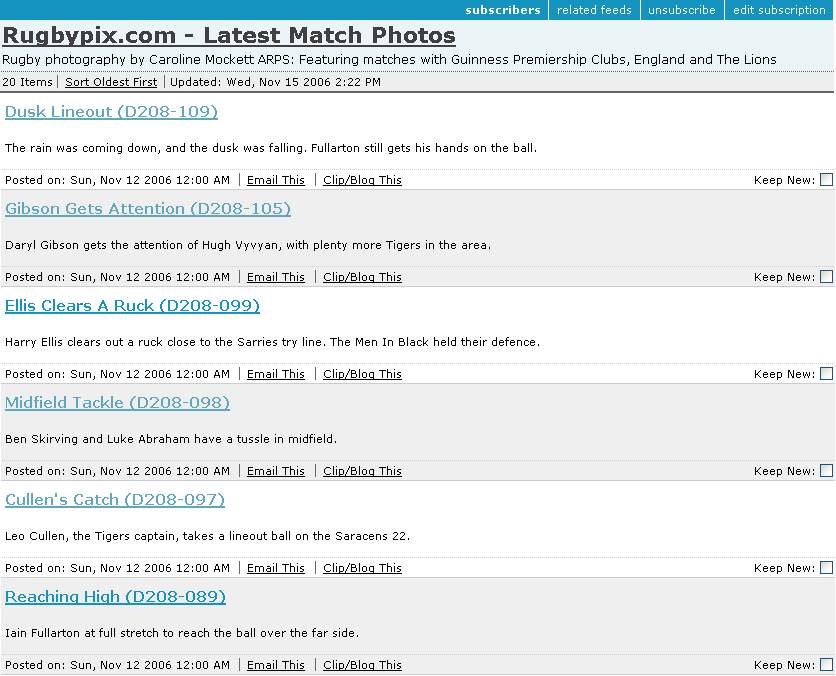
First off, Bloglines keeps a cache of the feed, and so it's only showing an early version of the rugbypix feed (without thumbnails) in this screenshot:

Also, if a feed has 40 items (I sometimes post a large batch of images so didn't want to limit the feed to the last dozen or so), it only shows 20 - the oldest 20. So when other feed readers show the last two matches (40 images = 2 games, 20 images each), Bloglines will only display the last but one game's pictures, not the latest 20. [Add: between composing this and actually posting it, Bloglines has now caught up and refreshed the feed - but it did take about 48 hours!]

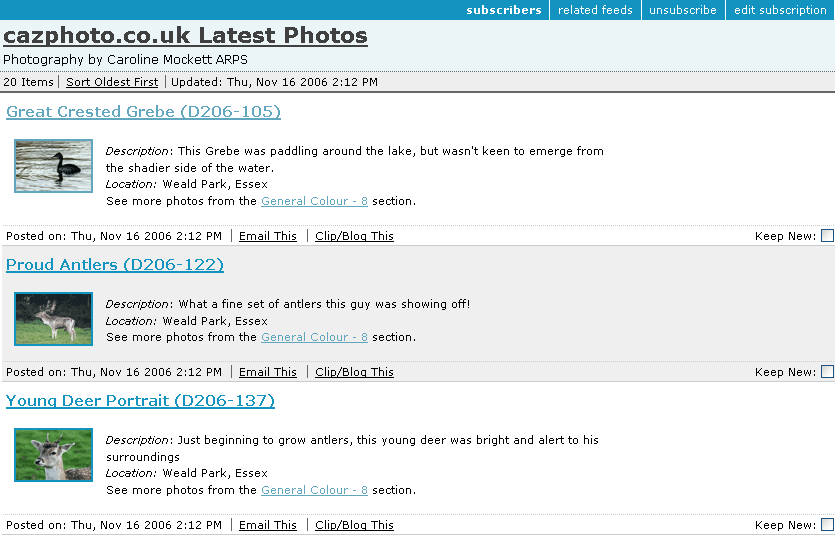
The cazphoto feed looks a little better (I'd got the hang of formatting by now):

Next we see what it looks like in YahooMail Beta feed reader:

Quite a nice presentation, but it doesn't show the date up very well.

Google's feed reader makes a nice job of things in expanded view:

Plus it offers a cutdown list view if you so wish:

I also tried the Sage plugin for Firefox, which gives yet another take on the display, showing a 3-pane affair, feeds at top left, item summary of feed in bottom left and a rather more snazzily-laid out view of each item in the right pane:


So there we have it - a small sampling of feed readers. What's your favourite feed reader, and how well does it render your chosen feeds? One final (surprising) thing I found out during my investigations was that the standard Flickr Photo Feeds don't validate! Oops!

Publicising Your Feed
It's no good having a feed and no-one knows it's there. Adding a suitable link (often showing the Feed icon icon) to your website can help. Also, add a link in the head of your page to tell feed readers your feed is available. This takes the format:
<link rel="alternate" type="application/rss+xml" title="My Feed " href="http://www.mysite.com/rss/">
Third Party services such as pingomatic can also help raise the profile of your feed. Happy pinging.

Tuesday, November 14, 2006

World Usability Day


Did you know that today was World Usability Day? No? Neither did I until an email landed in my inbox from Userfocus, a UK-based usability/accessibility consultancy.

There's a one-day event held in Nottingham today, with lots of interesting speakers. But I'm particularly gutted to be missing the talk entitled:

“What Farmer Buckley's exploding trousers can tell us about web usability”, by Dave Travis of Userfocus Ltd, (211 Piccadilly London W1J 9HF)
What, indeed?

I'd love to hear from anyone who attended, and might be able to shed some light on Farmer Buckley's mishap!

Saturday, November 11, 2006

Making The Most of Yourself

As an aspiring freelancer, soon to be cast adrift from corporate life, I've obviously been taking all opportunities to get advice on promoting my services and attracting clients. Three great posts have come to light in the past couple of weeks:

  • First up, Andy Budd lists 7 Habits of a Highly Successful Freelance Web Designer - some great tips, and ones I shall be keeping in mind for my own career development.
  • Andy also raises some interesting questions in his Blogging For Business and Pleasure article. One way to raise your profile in the web sphere is to blog regularly, and whilst it might not attract huge numbers of clients beating down your door (depending on their tech-savvy research), it can certainly pay dividends in terms of securing freelance work with other design companies, for instance. Andy employs freelancers on a regular basis, and says:
    By building your reputation as an expert, people will be happy using your services and recommending you to others. Blogging is a particularly good way of doing this and is something I highly recommend. When looking for a new freelancer I’ll get a much better sense of their interests and abilities though their blog than I’d ever get from reading a resume.
  • One of Andy's recommendations is to get a killer portfolio. On this theme, Jeff Veen gives us Five Steps to a Better Design Portfolio. Again, lots of good advice from people that have been there and done it (and done it very well).
Back to the networking theme...
I've just attened a two-day workshop, run by Penna, which helps people with their career transitions - what a nice way of saying "redundancy", LOL. One statistic to come out of that was the fact that only 10-20% of new appointments are actually filled via advertised recruitment - the rest come from personal recommendations or individuals targeting the right people with their resumes. I was really surprised by how low that figure was, but our course leader pointed out that most people will spend their energies concentrating on this 20% and completely ignore the other 80% of, albeit hidden, opportunities.

Networking in a formal, business sort of environment has always struck me as particularly dull, but I've had a great time at recent geek events, chatting over a beer, and getting to know people. Now that sort of networking, I could really get to enjoy!

And of course, it's not a case of bounding up to people and saying "gizza job!" - oh, no. The seeds might be planted now, but the rewards might not be reaped for months or even years. It's a long term bet, but one in which it's well worth investing.

Friday, November 10, 2006

Patronage And Other Musings

You may have noticed the "i'm patronising" badge on the side of this blog. What's it all about? Well, Joe Clark has a big plan and he needs small donations towards keeping him fed, while he spends four months trying to raise $7 million (canadian) to undertake the research he wants to carry out. He's targeting four major strands of accessibility, and has set up the Open & Closed Project in order to do so. By donating a modest sum, folks like you and me can make a small contribution, which in turn will allow Joe to make a big one. Good luck Joe!

Two more recent posts concerning accessibility have caught my eye:

Tuesday, November 07, 2006

London 2.0 RC9

That sounds like a mouthful, but was actually a fun evening at the Old Bank of England, a wonderfully atmospheric pub in Fleet Street.

It's the first time Sheila and I had been to a "London 2.0" event, and we got there quite early due to being able to skive off our regular commitments in plenty of time.

Before long, we were joined by other new faces and old timers. It was great to catch up with some people I'd not seen for a while and make other new friends, including:

  • Liam Clancy - sporting a new haircut, but we still recongnised him!
  • Mike Butcher of Techcrunch, who kindly bought a round and promptly wandered off before we could have a proper chat.
  • Richard Livsey a newbie to the London developers scene, who had rather bravely cycled to the venue - hope your bike was still chained where you left it, Richard!
  • Simon Whatley who was happy to chat with us, drink beer and blether on about the rugby for most of the evening.
Looking forward to the next London 2.0 do, I'll certainly hope to speak to some more of the regulars next time.

Tuesday, October 31, 2006

Wonky Feeds

Apologies for anyone reading my posts via feedreaders, rather than directly on the blog, who may have been wondering why some of my oldest posts are suddenly appearing.

In addition to the new design, I've also been making use of the blogger beta's "label" feature (aka tagging) and updating old posts with suitable tags. Unlike the old version of blogger, which never seemed to care if you went back and updated a post, the beta version makes updated posts float up to the top of your site feed. Hence some older stuff appearing on the list!

Hopefully, it won't happen again on the same scale, since I'll be tagging each post as I write it. Sorry for any confusion!

Monday, October 30, 2006

I've Had A Facelift!

A virtual one, not a real nip & tuck.

After weeks of dithering, I've finally upgraded my blogs to the blogger beta account (there was no going back, so I wanted to be sure before I jumped!). And while I was at it, I thought I would take the opportunity to choose a new template, more in keeping with the colour scheme of my website, carolinemockett.com

It's taken me a while to get my head round the new blogger template widgets, and when I've had more of a play, there may well be a few more tweaks to the Emperor's New Clothes (or should that be Empress?)

Sunday, October 29, 2006

Browser Wars or Spoiled For Choice?

Two new browsers have launched in the same week. As Olly says, it's a bit like London Buses. First a drought, and then they all come at once.

Firefox 2 - first impressions

As a regular user of FF1.5, I was keen to get the 2.0 release and like the slightly "shinier" look of the browser - someone's polished the chrome!

I found an excellent article on tweaking Firefox, and have done a little customisation to make myself happy with it. One thing I was having trouble with - the new version put an "X" on every tab to close it, whereas 1.5 just had the one at the righ hand end of the tab bar.

Fiddling with the browser.tabs.closeButtons parameter, and setting it to "0" just gives you the close button on the active tab. Much better!

The browser.tabs.tabMinWidth default is 100[px]. If you have many tabs open at once, you end up with scroll arrows in the tab bar, and only get about 7 tabs across by default before this happens. Changing this parameter to 75 gives you about 10 tabs before they start scrolling.

I like the "Recently closed tabs" in the History menu too - how many times have you closed a tab, only to think, "damn, I wanted that one"? Restore it quickly via this menu, and voilà!

Setting browser.urlbar.hideGoButton to "true" (default false) will get rid of the annoying green arrow next to the address bar. Personally, I never use it, I'm in the habit of bashing "return" once I've typed in a URL.

There are other new features, but I've yet to fully explore them.

IE7 - first impressions

I've been waiting in trepidation for Microsoft's latest browser to be released. Yet ANOTHER browser us poor web developers will have to take into account when testing our sites. Yesterday, I bit the bullet.

No troubles in downloading the update, or installing it (thankfully!). Similarly, I went and trawled the evolt.org browser archive for a standalone version of IE6. I've heard some people have had problems with these standalone versions, but thankfully, no aggro as yet. So I've now got IE6, IE5.5 and IE5.01 on my PC too. Along with Opera, that has most of the major PC browsers covered.

Looks like none of my sites have major issues in IE7 - thank heavens! But I would have been surprised if they did - most were designed with standards in mind (IE7 is just catching up with the standards used by Firefox for years), and I haven't got loads of IE-specific hacks lurking in my code.

Two things about IE7 I do like, and don't think Firefox2 has (let me know if I've missed these options buried in FF somewhere):

  1. Page thumbnails
  2. Whole-page zoom
Page Thumbnails

If you click the thumbnails tab at the LHS of the tab bar (outlined in red) -
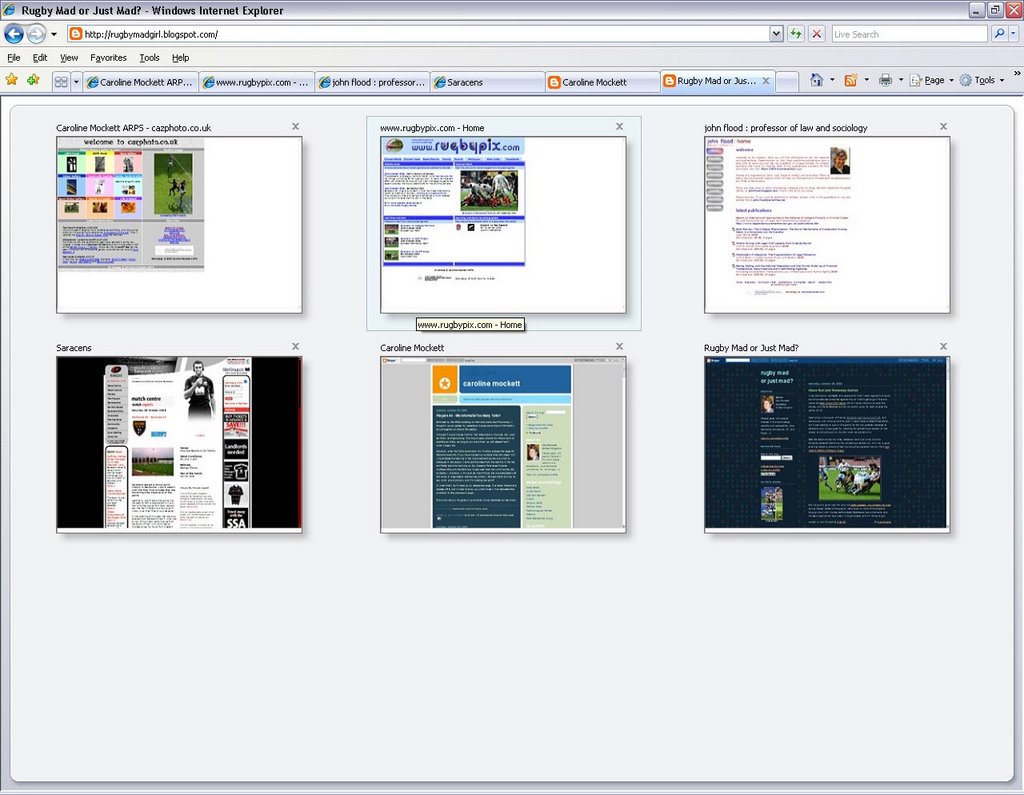
the browser gives you a large thumbnail of what each tab's page looks like. A bit trivial if you have lots of different sites open, perhaps, but useful if you quickly want to tell the difference between several pages from the same site. The thumbnail display looks like this:


Whole-Page Zoom


And secondly, with accessibility in mind, IE7 will actually zoom the whole page, rather than just text. So if your standard page looks like this:

Once the page is zoomed, even up to 400%, it makes a pretty decent job of rendering text in graphics at this larger size (click the image below to see an actual-pixels version):


I'm sure there will be little niggles and glitches which become apparent as the web community gets used to these new browsers. For the moment, although I see IE7 as a massive improvement over the crusty old IE6, I don't think it's quite persuded me to swich from Firefox as my default browser. And that's largely to do with the developer extensions and addons I use. Perhaps for a regular surfer, it would be enough.

Finally, A Night At The Opera

Lastly, I've just downloaded the upgrade for Opera, now version 9. The Opera website details what's new in Opera9. Haven't really had a chance to look at this in depth, but it's always good to have another browser option to test.

Tuesday, October 24, 2006

Playpen #4 - Microformats/Too Many Tails?

Enthused by the WSG meeting on Microformats last Thursday, I thought I would update my website to include some hCard information, so put together an About Me section.

I thought I would include links to "me" elsewhere on the web, too - such as Flickr and Upcoming. The hCard spec allows for these sort of additional URLs, as long as you mark them up with class="url", which I duely did.

However, when the Tails extension for Firefox scrapes the page for Microformat info, if you have marked up multiple links with class="url" - it just takes the last one in the vCard element as the one which is displayed in the popup. I removed the class from the last link in the list, and Tails took the next one up. So, it seems Tails doesn't parse mutlitple URLs and list them too, it just uses "last man wins" as the URL to display - a shame :-( It would be nice if it took the one associated with the name or organisation element as primary. Perhaps there is a way to say which one is primary, and I'm missing the point?

In order that I don't mess up my about me page, I've taken these extra classes off it, but in order to show you what I mean, I've replicated the problem in the playpen4 page.

If anyone has any thoughts or comments, I'd be interested to hear them.

31st October - add:

Further to Trovster's comments, here are two screenshots for my version of Tails (0.3.4):

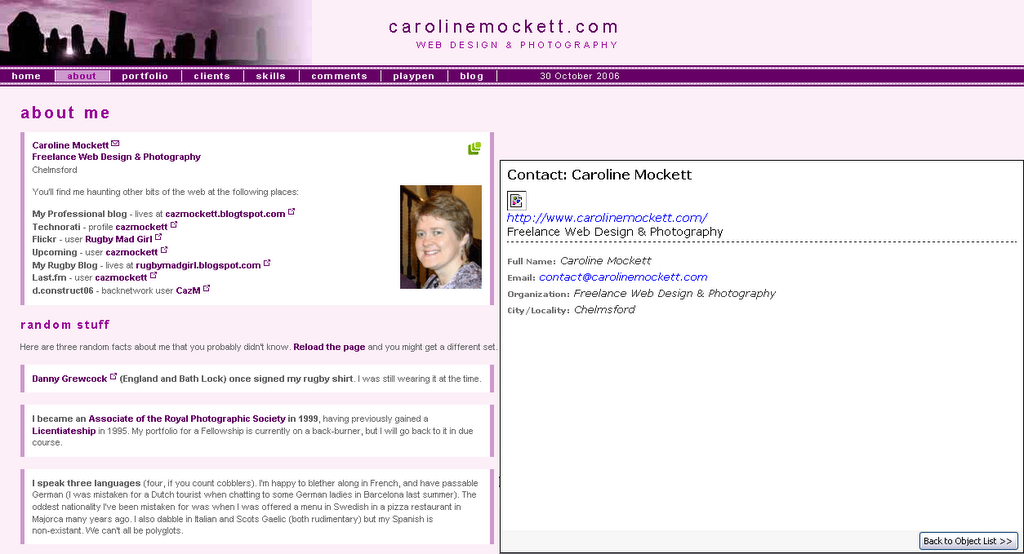
[click for a bigger version] - Tails displays my Contact details with just one URL: the link surrounding "Freelance Web Design & Photography" is the only anchor marked up with class="url" on this page.

However, the playpen4 page looks like this with Tails:

[click for a bigger version] Tails still displays just one URL, but this time it's the last one in the hCard list marked up with class="url", this time the link for my dConstruct Backnetwork profile.