Monday, October 23, 2006

Advanced Driving Techniques

I had to take a drive down to the main sorting office earlier on, to collect a parcel. It had a customs charge of £3.68 - fair enough - and a £4.00 "Royal Mail Administration Fee" on top.

<rant> HOW MUCH ?!?!?! </rant>

Anyway, that wasn't the point of this post...

My route home from the PO takes me past the County Police HQ, and just outside it, a vehicle cut me up by pulling in front and proceeded to do 15mph (in a 30 limit) until the next junction, where it turned left without indicating! Sadly, I was going the same way, and the car (still doing 15mph) then pulled up outside the County Court, giving 1 second's worth of indication and "parking" half in and half out of the layby.

It was a display truely worthy of someone out on their first driving lesson. But the reason I was so shocked? It was a marked patrol car!

Sunday, October 22, 2006

Microformats Extension for Dreamweaver8

Having downloaded Brian Suda's Microformat Cheat Sheet, I had been methodically adding XFN and hCard info to previous blog posts by messing under the hood in split/code view. All very tedious. As I added similar stuff for the nth time, I was just thinking, "wouldn't it be nice if some clever type had written a DW extension to do this..."

No sooner thought, than found - more or less by accident, I've just discovered the Microformats Extension for Dreamweaver8 at the WaSP website. Now it really is a no-brainer to add Microformats to any page.

After installing the extension, you get the Microformats tab appear at the end of the Insert Bar:

Microformats Insert bar for Dreamweaver 8
The first icon gives you the hCal dialogue box:

hCal dialogueFill it in, and lo! and behold, you get the relevent hCal code in your page:

<div class="vevent">
<a class="url" href="http://www.mypub.com">
<abbr
class="dtstart" title="20070101T1200"> January 01, 2007 - 12:00 </abbr> - <abbr class="dtend" title="20070101T2344"> 23:44 </abbr> - <span class="summary"> My Birthday </span> - at <span lass="location"> down the pub </span> </a>
<div class="description"> Let's meet for a few New Year drinks! </div>
</div>

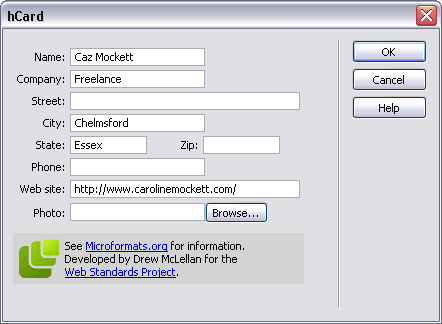
Next up is the icon for hCard, and pushing the button gives us:

hCard dialogueWhich produces:
<div class="vcard"> <a class="url fn" href="http://www.carolinemockett.com/">Caz Mockett</a>
<div class="org">Freelance</div>
<div class="adr"> <span class="locality">Chelmsford</span>, <span class="region">Essex</span> </div>
</div>

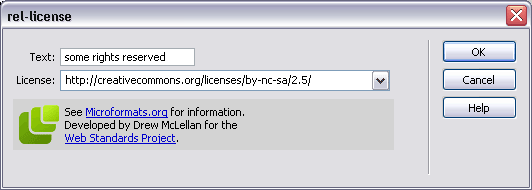
The third icon is for the rel-licence attribute:

rel-licence dialoguegiving the very simple
<a href="http://creativecommons.org/licenses/by-nc-sa/2.5/" rel="license">some rights reserved</a>
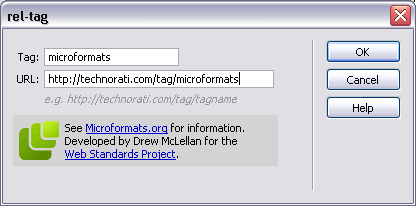
The little "luggage tag" icon gives us the rel-tag dialogue (of course):

rel-tag dialoguewhich gives us
<span class="technoratitag">
<a href="http://technorati.com/tag/microformats" rel="tag">microformats</a> </span>
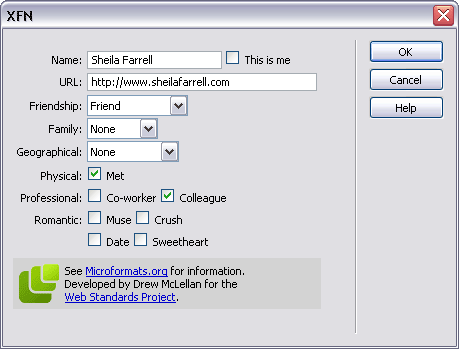
Finally, the dizzy-looking heads icon is for the XFN widget, which really is very neat indeed:

XFN dialogue
giving us this little code snippet:
<a href="http://www.sheilafarrell.com" rel="met colleague friend">Sheila Farrell</a>
Fab. All of a sudden, my life has become easier. Drew, you're a genius!


Saturday, October 21, 2006

Geek Dinner With Molly Holzschlag

Great evening at the Geek Dinner last night, with guest Molly Holzschlag. I've only been to one other, where Chris Anderson gave us a talk about The Long Tail, so I was a bit surprised that Molly didn't give a presentation as such, but we all enjoyed her company and she was pleased to chat with anyone about anything.

It was nice to catch up with existing friends; Sheila Farrell, Robert Lee-Cann, Ross Bruniges, Ian Forrester and Chris Heilmann, plus make some new ones! I had interesting chats with:

So there we are, a good group of names I can now put faces to - see you at the next one folks!

Oh, and fresh from the recent Microformats WSG-meet, I've marked this up with a load of hCard info :-)

Friday, October 20, 2006

WSG London #2 - Microformats

The second London WSG meeting was all about Microformats, something I've been meaning to get to grips with for a while. What are they, and what are they good for? We had three Microformats "Ghosts" to help us understand more about them:

The Ghost of Microformats Past - Mark Norman Francis Esq of Ye Olde Yahoo! Corp. Norman gave us an overview of what Microformats are for, and why they have evolved:
  • They should be there for humans first and machines second
  • They are a way of encoding data
  • Start simply, and re-use building blocks from other standards
  • They are modular and embeddable
  • And most importantly, they should attach extra (explicit) meaning to (implicit) content.

One of the first Microformats to evolve was the XFN standard in 2003. In its simplest form, this adds the "rel" tag to an anchor link (for a person's blog, say), where you can specify your relationship to them. See my other post on XFN for more info.

In 2004, the Creative Commons Licences took off, and the rel="licence" tag was added to the Microformats arsenal, eg: Creative Commons, <a href="http://creativecommons.org/licenses/by-nc-sa/2.5/" rel="licence">some rights reserved</a>

A lot of sites have invisible meta data hidden in their pages, but which might as well be invisible - visitors can't see it, and content authors often forget to update it. Norm's phrase was out of site/sight, out of mind. If a human can't see it, the metadata might as well not be there.

He briefly discussed why using XML namespaces was considered harmful. They are not well supported, even in modern browsers, and are antisocial (giving rise to the namespaces Tower of Babel).

But on 20th June 2005, http://microformats.org was unleashed on the web community. In 15 months, there has been a huge adoption of them, basically because they are simple, sensible and extensible. Most popular have been the hCard and hCal formats, along with the rel-licence, rel-tag and afforementioned XFN.

Out in the wild, heavyweights such as WordPress, Yahoo!, Google, Technorati have adopted microformats. With a very small tweak to one of their PHP templates, Yahoo Local have suddenly made 15m new hCards available on the web!

Next up was The Ghost of Microformats Present, Mr Jeremy Keith of Clearleft

Jeremy started out by reminding us that the (X)HTML specs do not have specific tags for semantic items such as contact details, relationships, events or reviews, and with the addition of a little bit of extra markup (mainly attributes to existing elements), we can explicitly specify these things in existing markup.

  • Elemental Microformats
    • the rel attribute:
      <link href="mystyle.css" rel="stylesheet" type="text/css" />
      In this case, the rel atribute defines the relationship of the linked resource to the current document (something that had never really occurred to me until the blindingly obvious was pointed out!) Similarly, <a rel="help" href="help.html">Help page</a> might explicitly define a help document for the page containing the link.
      <a rel="tag" href="http://en.wikipedia.org/Microformats">Microformats </a>
      tells us that the link is also a tag.
      He also mentioned rel-licence and XFN as above.
    • the rev attribute:
      Less well known and trickier to get your hear round, the rev attribute defines the reverse relationship to "rel". So in the above example, on the help.html page, you might find a link thus: <a rev="help" href="checkout.html">the checkout page</a> which would say, the current page is the help resource for the checkout page.
    • the vote-for/against attribute:
      You might include a link to someone else's blog, which expresses an opion (be it negative or positive) which you agree with. Then use:
      <a rel="vote-for" href="review.html">a damning critique</a>. The rel="vote-against" is of course, the opposite (you disagree with the opinion, whether it is positive or negative)
  • Compound Microformats
    These add more than one attribute - usually classes - to elements. We mustn't forget that classes are for general purpose processing by user agents - NOT just for CSS - and should add extra semantic meaning to a document. He cited the hCard example for contact details on a blog:
    <address class="vcard">
    <a href="http://joebloggs.com/blog" class="url org">
    Joe's Blog</a> is the online home of
    <a href="mailto:me@jobloggs.com" class="email
    fn">Joe Bloggs</a>, a <span class="title">web
    developer</span> living and working in <span class="adr">
    <span class="locality">London</span>,
    <span class="country-name">England</span>
    </span>.
    </address>

Other things we need to consider are tools for creating and viewing Microformats. The hCard-O-Matic will give you a head start on writing an hCard for contact details, as will the hCal-O-Matic for events. Brian Suda's Microformat Cheat Sheet should also be a must if you're needing a quick reference guide.

On the discovery end of things, the Tails extension for Firefox is great for finding microformats on a page. For those folks not running Firefox, John Hicks has written a client-side stylesheet to highlight microformats, and he's updated it already. Tantek's microformats favelets let you copy hCard or hCal information into your address book or calendar. And Technorati have started to index microformats too!

Jeremy has kindly put his slides together as a PDF - but they're never as much fun as seeing them delivered "live" ;-)

Finally, a taste of things to come? The Ghost of Microformats Future, aka Drew McLellan , also of Yahoo! Europe, and a member of WaSP

Drew immediately got everyone's attention by asking, could using Microformats on your current site effectively replace your API? He demonstrated numerous instances where complex calls to APIs could be supplanted with the relevent microformat codes in the page, and pretty much showed us what they could become given enough widespread adoption. You cane see Drew's slides online, as I didn't have time to scribble all the fiddly bits of code he demonstrated.

One site which has no API but is littered with useful microformats is corkd.com. You can extract contact info or reviews at will, if you have the right plugin widgets.

Drew also drew our attention to some useful tools:

Brian Suda's X2V transformer - takes XHTML hCal/hCard and munches them into vCard/iCalendar files. Then there's Drew's new tools.microformatic.com site.

Questions and answers were welcomed by our Three Musketeers. Yahoo! memory sticks were given out as goodies to anyone who asked a question. One interesting question that stuck in my mind was asking if there were any microformats for mobile? Jeremy quipped that they are smaller than that, and there's more information on picoformats at the microformats wiki.

A very long post; wrapping up I'll say we all enjoyed a beer with the other geeks in the pub afterwards! Thanks to Stuart for organising the meet. He's already put up the podcast feed from the event. I'm looking forward to the next one, whenever that comes round.


Tuesday, October 17, 2006

Gone Into Hiding?

You may have wondered if I've gone into hiding as the blog has been very quiet lately. Well, the answer's no, but I have had a week off doing stuff at home and not going near the computer very much. Makes a nice change, every now and then!

Emerging from my exile, I'm blinking in the bright light of day and trying to catch up with a bit of blog reading, writing and other pc-related stuff.

Olly Hodgson has some excellent links, which I've been following up, and then generally getting lost in the blogsphere. I'm also waiting with baited breath to see how The CSS Div almost got himself killed...

Here's a few good posts about accessibility issues:

As an antidote to my recent exile, I'm also being very sociable this week, with the upcoming events in London to attend - WSG London #2 - Microformats and the London Geek Dinner with Molly H. Will report back on them later in the week.

Friday, September 29, 2006

Tips For Business

I was perusing Derek Featherstone's blog the other day (entitled Box of Chocolates, which immediately got my attention!) when I came across two articles of interest about success in business:

Five Business Mistakes I’ve Made
Ten Smart Moves to Improve your Business

Both contain wise words, which are now of particular relevence to me, since I heard yesterday that my current employer has agreed to let me take voluntary redundancy in the New Year. Looks like I'll be working my notice and then free to set up my own freelance design & development company with my payoff! All very exciting, and just a little scary; but I'm looking forward to the challenge immensely.

Wednesday, September 27, 2006

Playpen #3 - Changing Your Stripes

You know what they say about Leopards... well at least you can get a table to change its stripes with a bit of DOM scripting.

It's a fairly trivial problem, but seeing as I'm pretty green when it comes to unobtrusive JavaScript, it's somewhere to start!

The Playpen #3 page shows off the table, which has a new class added on alternate rows, and defines a new background colour in the CSS. OnMouseOver will change the class again, to give another colour. But I'm having real trouble resetting the original class/colour onMouseOut... It's probably because the DOM is changed on the fly, and the original (not moused over) state of the alternate row is never actually "stored" on the page. If anyone has any suggestions, I'd be very interested to hear.

For the record, my stripeTables script looks like this:

function stripeTables() {
if (!document.getElementsByTagName) return false;
var tables = document.getElementsByTagName("table");
for (var i=0; i<tables.length; i++) {
var odd = false;
var rows = tables[i].getElementsByTagName("tr");
for (var j=0; j<rows.length; j++) {
if (odd == true) {
addClass(rows[j],"altrow");
odd = false;
} else {
odd = true;
}
}
}
}

addLoadEvent(stripeTables);

And this is highlightRows:

function highlightRows() {
if(!document.getElementsByTagName) return false;
var rows = document.getElementsByTagName("tr");
for (var i=0; i<rows.length; i++) {
var rowclass = rows[i].getAttribute("class");
rows[i].onmouseover = function() {
addClass(this,"highlight");
}
rows[i].onmouseout = function() {
this.setAttribute("class" , "rowclass[i]");
}
}
}
addLoadEvent(highlightRows);
I thought getting the Class attribute and storing as rowclass would allow me to reset it to what it was before the onMouseOver event, but sadly the table rows become unstripey once they are moused over!

The only other way I can think of doing it is writing some sort of subtractClass script to complement addClass, but seeing as this will almost certainly involve hideous regular expressions, I'm rather shying away from that.

Anyone have any ideas what I'm doing wrong?

Sunday, September 24, 2006

Upcoming Events

I've recently signed up for Upcoming.org so I can keep an eye out on what's in the pipeline in the near future. Two events caught my eye, coincidentally on consecutive evenings (all we need is a third one and they'll be like London Buses...)

Thursday 19th October
Web Standards Group Meeting # 2 where Microformats will be discussed. See Muffinresearch.co.uk for more details.

Friday 20th October
London Geek Dinner, special guest Molly E. Holzschlag. See the Geek Dinner website for more details.

Both events look like a good evening; perhaps I'll see some of you there.

Saturday, September 23, 2006

Playpen #2 - Lightbox JS

The d.Construct Backnewtwork has a neat feature which hooks into the Flickr API and pulls out all suitably-tagged images of the conference. Then when you click an image, it appears in a rather sexy overlay window.

I've been looking for some time, for an unobtrusive javascript method of displaying a photo + caption in a popup, as I have several sites which require this feature, without needing to go for the overhead of dynamic pages or a page per image. Trouble is, most of the methods I've found haven't been friendly if you turn off JavaScript!

The latest issue of .Net magazine (#154) also has a tutorial on Lightboxes (Javascript Image gallery widgets), so I thought I'd give Lightbox JS a try.

It works great straight out of the box, is dead easy to inplement, and will let you customise quite a few features. If users have Javascript disabled, they still get to see the content (the larger image when you click on the thumbnail, albeit in a boring vanilla window), so it's fine from an accessibility standpoint. And I'm pretty sure it's the very same method the backnetwork uses.

I knocked a quick gallery together, which you can see at the Playpen #2 page.

Thursday, September 21, 2006

Beta Blockers?

Blogger has a new beta version out and is inviting bloggers to move over from their existing account. This involves signing in with a Google account - either using an existing one, or signing up for a new account.

Using systems in beta can be a "fun" experience - you might be the person to come across that little-known bug which completely ruins your day! Or you might find that all the new features are worth the little rough patches while everything gets ironed out.

I'll admit I'm dithering over whether I should jump ship and go for the beta release. There are certainly some great new features like the ability to restrict read access and add "labels" (tags to you and me) for searching and categorising your blog posts. OK, these two are features which other publishing systems like WordPress have had for some time (and I know of folks who have defected to WordPress from Blogger in the past due to these deficiencies).

One "hidden" benefit is their new dynamic serving of pages. In the past, you had to "Publish" each new entry or the whole blog when you made changes, to give the static HTML pages which made up your blog. If you forgot to republish, the changes weren't seen until the next time you republished. This was pretty tedious and took quite a while if you had large blog. In the new version, changes are made to the database immediately and each page is served dynamically on the fly at each request. No more waiting for the spinning logo to finish its whirling!

My ideal scenario would be to move just one blog (probably the RugbyMad one) and play with it for a bit to see if I have any problems, before moving this blog too. But it's not clear from the support info if I can do this - effectivley, both blogs are linked from one account, and I think it's the account I'm moving and not the blog specifically.

Anyway, if you're interested in what new features are in the beta release, here are a few links for you to digest:

Wednesday, September 20, 2006

Playpen #1 - Google Maps

Inspired by Jeremy Keith's piece at d.Construct the other week, I've finally dipped my toe in the water of fiddling with APIs - and like many, I decided to go for a Google Map.

It helped that there was a tutorial about that very subject in .Net magazine (issue #153), but when I tried it out, it wasn't working properly. I checked my typing repeatedly for spelling errors, but couldn't find why the map was rendering OK but the overlay bubble was not. Firefox's JavaScript debugger kept coming up with some weird error message about XML mismatches on a line which didn't even exist in the file!

So I turned to my newly acquired tome by Chris Heilemann (see, Chris, after your earlier teasing, I did go out and buy it!): Beginning JavaScript with DOM Scripting and AJAX. Sure enough, in the AJAX-based chapter at the end, I found Chris' take on Google Maps.

Between that, and the Google Maps documentation, I finally figured out how to make a map, add custom marker, and have the info bubble pop up when the marker is clicked. You can see my bit of fun on the Playpen #1 page

Tuesday, September 19, 2006

Further Reading

There was a dangerously-tempting bookstall at d.Construct the other week, and I found myself buying two books which have been on my To Be Read list for a while:

Beginning JavaScript with DOM Scripting and AJAX - Christian Heilmann, Apress
I think it will be an excellent companion for the DOM Scripting book I've already read by Jeremy Keith. Will do a proper review when I've read this in more depth.

Blog Design Solutions - Andy Budd et al, Friends of ED
Great advice for customising your blog. Not just in terms of look and feel, but also advice on hosting your own blog, setting up testing environments, databases etc. I hope to give this blog a "lick of paint" in the near future!

I've also recently finished Dan Cederholm's excellent book:
Bulletproof Web Design - Dan Cederholm, New Riders
This one is a must-read for anybody seriously contemplating standards-based web design. Dan takes common table-based solutions (which can still be seen in the wild), explains why they are not bulletproof, and then reworks the solution in a standards-based way. I was very impressed with the session he did for @media in June, and this takes things even further. A great reference for bulletproof techniques.

Wednesday, September 13, 2006

Podcasts - Usability & Accessibility

Roger Kondrat over at TechWinter has two excellent Podcasts about usability and accessibility - two areas of particular interest to me.

To listen to the podcasts, go directly to Roger's blog:

#1: What is Usability and what does it mean to me? - a discussion with Lisa Halabi, Head of Usability at WebCredible.

#2: What is Accessibility and what does it mean to me? - a discussion with Trenton Moss, Head of Accessibility at WebCredible

They both make excellent points, and give sensible advice for those wishing to convince clients or superiours of the value of good usability and accessible sites.

It amazes me that, with so many positive benefits to using semantic XHTML and CSS, (not least the "freebie" benefit of much better SEO for your site), some company'sdesign mindsets are still rooted in tables and inline code soup.

Tuesday, September 12, 2006

Blogger/Web2.0 Mixer Event #2

Roger Kondrat over at TechWinter organised the second Blogger/Web2.0 Mixer Event last night, and a great success it was. About 40-50 bloggers, startups and web entrepreneurs got together for chat, beer and chips, at All Bar One in Soho.

I met some interesting people, including:
  • Chris Toudic of Jobneters, a new job network which has just gone live.
  • Chris Scollo and Philip Wilkinson of Crowdstorm (good to see you guys again), a new Social Shopping site which launched in public beta last week.
  • Ewan MacLean from SMSTextnews, who was very enthusiastic about all things mobile. He agreed to interviewed for a podcast by Andy White, of Summit Solutions, who was polling people about their Blackberries. Ewan made some very interesting comments about his use of mobile email devices.

Thanks again to Roger for organising the event; keep an eye out on his
blog for future events (I'll almost certainly mention it here too, when
there's more info to pass on).

Friday, September 08, 2006

d.construct debrief

Otherwise known as the dConstruct Party...

But first, I'd like to say what a great time I had at the conference. Some really informed and informative speakers; nice venue (apart from the pokey seats) and plenty of subjects to get the braincells working. And of courese, plently of opportunity to meet like-minded geeks for beer, chat and crazy golf!

Here's some of my pictures taken around the after-party.

[Sunset over the wreckage of the West Pier]

[Bright On Neon. OK, bad pun]

[Ross and his Paps on the crazy golf circuit]

[Who ate all the pies? A conference-goer wishes to remain anonymous]

You can see all my d.Construct/Brighton images at Flickr.

I met some great people, amongst whom were:

The other great thing about the conference was the excellent backnetwork site - no problems if you forgot to get someone's card; just look them up later, or read their aggregated blog posts and view their Flickr pictures, all in one place. Every con' should have one!

Lastly, here's a cheeky little desktop which I spotted during the first session of the day - great to stop the Over The Shoulder Snoopers?

[Stop Looking At My Screen!]

d.construct, Designing The Complete User Experience

A presentation by Jeffrey Veen

[Jeffrey Veen gets excited talking about his old job at wired.com]

Jeff Veen's presentation where to start? He's a very charismatic and engaging speaker, and this was no exception. You can download his presentation slides from his website. But here are a few bulletpoints.

Three criteria you should think about before producing a site:

  • Viability - business case and reasons for building a site
  • Feasability - can it be done?
  • Desirability - do people want it?
[The best products are the most desirable]

Your site's architecture and structure should always be extensible. Even if you start small, plan for expansion! Otherwise...

[What could happen to Amazon by the year 2050...]

Design faces global challenges, but even at a local level, terminology can vary widly. In the US, a survey was conducted to see what people asked for when ordering a fizzy drink. The results were pretty mind-boggling!

[I'd like a can of coke/soda/pop/other (delete as appropriate)]

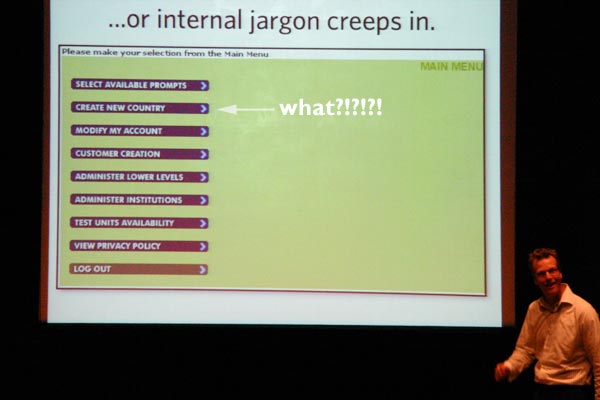
Terminology can be important when labelling application functions. What happens when internal jargon creeps in - or is it megalomania taking over?

[Create New Country?!?!!]

Understanding Your Visitors is a crucial step in putting together a useful, usable website. Using simple stickie notes to group together functions vs what users are trying to achieve (card sorting) can show up gaps in both directions:

[Mind The Gap mapping]

Top half maps user tasks and bottom half maps website features - the trick is not to have gaps either way. No point wasting resources engineering something that nobody wants, but completely ignoring a facet of the site that is not currently available but users are crying out for.

Finally, Jeff pointed out that it's much more expensive to change your mind (add new features) the closer you get to launch. Proper user research means you are not wasting time, money and resources by going up the wrong garden path.

d.construct, Understanding Folksonomy (Tagging That Works)

A presentation by Thomas Vander Wal

  • Folksonomy is the result of personal, free tagging of pages and objects for one's own retrieval.
  • Tagging is done in a social environment (it's shared and open to others)
  • The act of tagging is done by the person consuming the information

These tags are important because people will use their own vocabulary to tag, which is meaningful to them. Tags can add perspective or context, and can make up for missing meta data.

The interesting things happen when you see tags in relation to the

Dual Folksonomy Triad:

[Thomas explained The Dual Folksonomy Triad]

People tag something within their own sphere of interest, but can then use that tag (in the form of a tag cloud search) to pivot and find material which other people have tagged in a similar fashion. Bonds and communities can form around these social groupings. Try following a tag trail in Flickr - you might be surprised where you end up!

There is always a tension between Consumer/Folksonomy vs Businees/Taxonomy. A business might wish to call their latest widget by the model name, MyFantasticWidget. But real consumers out there often refer to it quite differently, with emergent vocabulary. They might want to call it "DeadCoolWidget" instead. Business ignore such folksonomy at their peril.

I hope Thomas will post his slides to his blog in due course.

d.construct, Accessible Web Applications In A Post Web 1.0 World

A presentation by Derek Featherstone

[Derek waves his arms and steadfastly refeses to use the phrase "web 2.0"!]

Derek is an accessibility expert who is trying to get the message across that, even in a web2.0 world, accessibility should still be a goal, and and achievable one.

The web now is moving towards functionality and applications, and away from the document-centric approach. To make apps accessible, it is vital to separate the app into three distinct areas:

  • Content (eg semantic, standards-compliant XHTML)
  • Presentation (CSS does all the hard work)
  • Behaviour (javascript, AJAX or other behavioural language)
All too often, 1 and 2 are adhered to, but 3 still remains buried in the page, and therefore accessibility issues begin to kick in. What happens when someone doesn't have JavaScript enabled? Can they still see the content, etc.

One common example Derek mentioned was the default text you often find in a search box, which some JavaScript removes when the element gets focus. What happens if you're a blind user who fills in the box, tabs to the next form element, decides to tab back to the first, and can't understand why the text they thought they'd typed had disappeared!

Fix senarios - either make the JavaScript check, and ONLY removed the default text, but retain the user-input text. Or, perhaps don't use default text at all, but instead use a Tool Tip on the form element to give some more information.

Similarly, validation error messages should always appear near the form control they validate. If you put it at the top of a page, and a user has the screen hugely magnified, they will never see the error text as it's well out of their portion of the viewport. Perhaps changing the background colour of an element which fails validation could also be useful.

So if it's easy to get such simple things wrong, what about applications using AJAX which can be very complex? The answer is, wherever possible, to try and make the content linearised within the page by setting tab orders etc to "lead" users through their application journey in a sensible way.

Tabindex="-1" might sound like an invalid value, but it is supported by IE and Firefox. It can be programmatically, as it does not show up in a tab set, but you can use it to force focus onto an element.

Drag and Drop interactions are great for the mouse-enabled community, but pretty hopeless for those only using a keyboard. So don't make it the ONLY way of doing something. Also, make the "hit area" of links or things to drag as large as possible, so that users with impaired mobility don't have to be so accurate with their mouse movements.

d.construct, Mash My Flex Up

A presentation by Aral Balkan

Poor old Aral drew the short straw and was in the "graveyard shift" straight after lunch. I think he got us all on his side straight away by holding his hands up and coming clean:

["Don't shoot me, I'm a Flash developer!"]

Now I must confess that I'm no Flash guru. I have built one site with Flash5 (it was a long time ago!) and did a minimal amount of ActionScripting for that, but Aral's knowledge and experience was way beyond mine! So I didn't take too many notes, I just tried to watch and keep up :-)

  • He gave a quick overview of Flex 2
  • Lets you declaratively design iterfaces by using MXML
  • MXML is XML
  • Scripting uses ActionScript3 (which is ECMAScript4)
  • Looks like Java, smells like Ruby
  • AS3 is optionally typed, and a dynamic language
  • Compile MXML and AS3 to SWF bitecode
  • Each MXML tag represents an AS3 class
  • SWF bytecode executes in the Flash Player which is a virtual machine
  • Flex2 SDK is cross-platform and free
  • FlexBuilder2 is a visaul IDE based on Eclipse, costing ~£370
  • There's Flex Data Services and Server
  • RPC and real-time communication, video and audio streaming
  • There are also open source alternatives like Red5, AMFPHP and openAMF
Styling is applied with CSS. Data can be consumed via the following formats:
  • REST (see previous blog post)
  • XML-RPC
  • SOAP
  • JSON
  • Flash Remoting (= binary JSON)
For more information, see Aral's website and download his presentation.

d.construct, The Joy of API

A presentation by Jeremy Keith of Clear:Left.

Jeremy was very enthusiastic about the fun he's had meddling with APIs. He started off by explaining little about REST. I thought, "oh, no, something else I don't know about" but it turns out that REST is pretty much what the "normal" web is all about:

REpresentational State Transfer

  • The application state and functionality is devided into resources
  • Every resource is uniquely addressable. With HTTP, this is done via a URL.
  • It's a stateless client/server protocol: in HTTP, each message contains all the information necessary to understand the request when combined with the state at the resource.

Huh? Well, that more or less describes bog-standard web stuff: links, images, pages etc.

Then there's SOAP, Simple Object Access Protocol

Jeremy compared the APIs for four major sites which he has experimented with, and rated them for power, documentation (help) and his measure, "joy" of use. The results were as follows:

  • Flickr: power=9; docs=8; "joy"=9
  • Amazon: power=8; docs=8; "joy"=8
  • Delicious: power=6; docs=6; "joy"=6
  • Upcoming: power=6; docs=6; "joy"=6
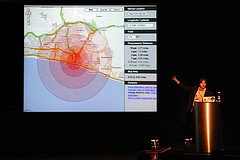
Maps often seem to be the most popular API for experiementation. Mashing mapping with other data feeds gives excellent geo-tagged information. What happens if you drop a 100KT bomb on the Corn Exchange, Brighton? Enquiring minds want to know...

[Mashed - that's what most of Brighton would be if you dropped a 100KT bomb on the Corn Exchange]

The oft-cited Chicagocrime.org site, a prime example of mapping + other stats, was actually written before the GoogleMaps API was released! Sounds like hard work. Other geo-tagged fun sites included:

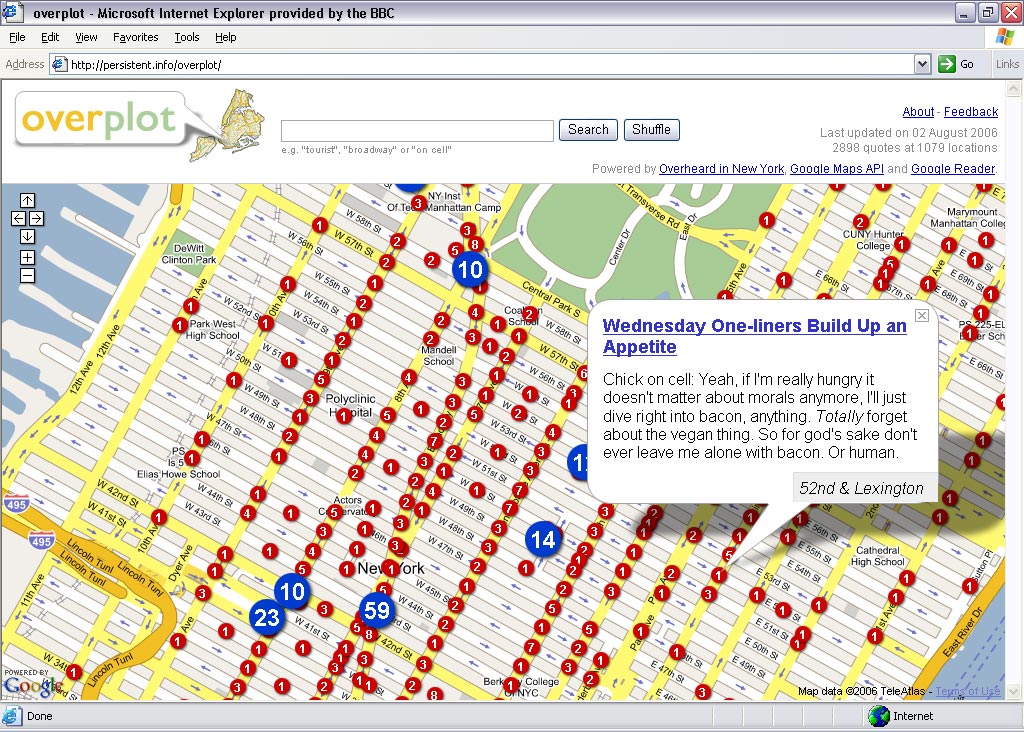
Overheard in New York + Google Maps = Overplot

[take care on 52nd and Lexington - watch out for the cannibal vegan!]

Gawker + Google Maps = GawkerStalker

[where are all the celebs to be found in NY?]

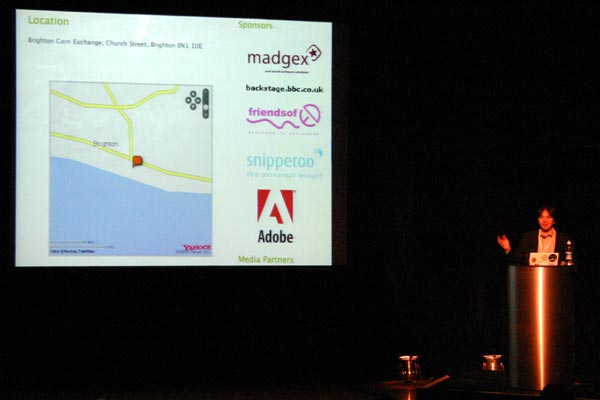
And finally, the most important point is that your mashups are only ever as good as your data. What happens if you look up Brighton with Yahoo maps instead of Google...

[oops! what happened to Brighton?]

Jeremy pointed us to some useful resources for getting started with APIs:

  • Programmable web tells you what's out there to be mashed
  • dapper lets you create a service from any website - DIY API?
  • microformats and all that they can achieve for you
  • mapstraction provides a common API for Google, Yahoo and Microsoft mapping

References from Jeremy's slides are available on his website.